Computer Evolution
Computer History and Development
Nothing epitomizes modern life better than the computer. For better or worse, computers have infiltrated every aspect of our society. Today computers do much more than simply compute: supermarket scanners calculate our grocery bill while keeping store inventory; computerized telephone switching centers play traffic cop to millions of calls and keep lines of communication untangled; and automatic teller machines (ATM) let us conduct banking transactions from virtually anywhere in the world. But where did all this technology come from and where is it heading? To fully understand and appreciate the impact computers have on our lives and promises they hold for the future, it is important to understand their evolution.
Early Computing Machines and Inventors
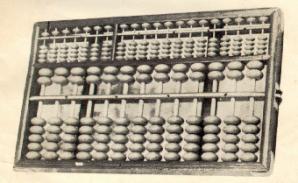
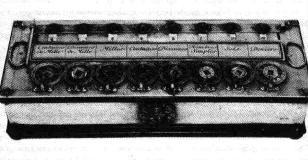
The abacus, which emerged about 5,000 years ago in Asia Minor and is still in use today, may be considered the first computer. This device allows users to make computations using a system of sliding beads arranged on a rack. Early merchants used the abacus to keep trading transactions. But as the use of paper and pencil spread, particularly in Europe, the abacus lost its importance. It took nearly 12 centuries, however, for the next significant advance in computing devices to emerge. In 1642, Blaise Pascal (1623-1662), the 18-year-old son of a French tax collector, invented what he called a numerical wheel calculator to help his father with his duties. This brass rectangular box, also called a Pascaline, used eight movable dials to add sums up to eight figures long. Pascal’s device used a base of ten to accomplish this. For example, as one dial moved ten notches, or one complete revolution, it moved the next dial – which represented the ten’s column – one place. When the ten’s dial moved one revolution, the dial representing the hundred’s place moved one notch and so on. The drawback to the Pascaline, of course, was its limitation to addition.
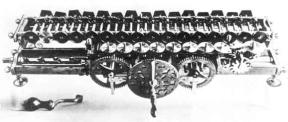
In 1694, a German mathematician and philosopher, Gottfried Wilhem von Leibniz (1646-1716), improved the Pascaline by creating a machine that could also multiply. Like its predecessor, Leibniz’s mechanical multiplier worked by a system of gears and dials. Partly by studying Pascal’s original notes and drawings, Leibniz was able to refine his machine. The centerpiece of the machine was its stepped-drum gear design, which offered an elongated version of the simple flat gear. It wasn’t until 1820, however, that mechanical calculators gained widespread use. Charles Xavier Thomas de Colmar, a Frenchman, invented a machine that could perform the four basic arithmetic functions. Colmar’s mechanical calculator, the arithometer, presented a more practical approach to computing because it could add, subtract, multiply and divide. With its enhanced versatility, the arithometer was widely used up until the First World War. Although later inventors refined Colmar’s calculator, together with fellow inventors Pascal and Leibniz, he helped define the age of mechanical computation.
The real beginnings of computers as we know them today, however, lay with an English mathematics professor, Charles Babbage (1791-1871). Frustrated at the many errors he found while examining calculations for the Royal Astronomical Society, Babbage declared, “I wish to God these calculations had been performed by steam!” With those words, the automation of computers had begun. By 1812, Babbage noticed a natural harmony between machines and mathematics: machines were best at performing tasks repeatedly without mistake; while mathematics, particularly the production of mathematics tables, often required the simple repetition of steps. The problem centered on applying the ability of machines to the needs of mathematics. Babbage’s first attempt at solving this problem was in 1822 when he proposed a machine to perform differential equations, called a Difference Engine. Powered by steam and large as a locomotive, the machine would have a stored program and could perform calculations and print the results automatically. After working on the Difference Engine for 10 years, Babbage was suddenly inspired to begin work on the first general-purpose computer, which he called the Analytical Engine. Babbage’s assistant, Augusta Ada King, Countess of Lovelace (1815-1842) and daughter of English poet Lord Byron, was instrumental in the machine’s design. One of the few people who understood the Engine’s design as well as Babbage, she helped revise plans, secure funding from the British government, and communicate the specifics of the Analytical Engine to the public. Also, Lady Lovelace’s fine understanding of the machine allowed her to create the instruction routines to be fed into the computer, making her the first female computer programmer. In the 1980’s, the U.S. Defense Department named a programming language ADA in her honor.
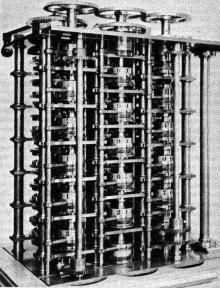
Babbage’s steam-powered Engine, although ultimately never constructed, may seem primitive by today’s standards. However, it outlined the basic elements of a modern general purpose computer and was a breakthrough concept. Consisting of over 50,000 components, the basic design of the Analytical Engine included input devices in the form of perforated cards containing operating instructions and a “store” for memory of 1,000 numbers of up to 50 decimal digits long. It also contained a “mill” with a control unit that allowed processing instructions in any sequence, and output devices to produce printed results. Babbage borrowed the idea of punch cards to encode the machine’s instructions from the Jacquard loom. The loom, produced in 1820 and named after its inventor, Joseph-Marie Jacquard, used punched boards that controlled the patterns to be woven.
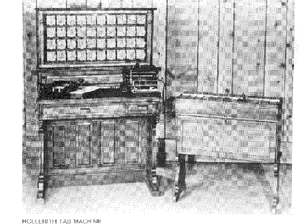
In 1889, an American inventor, Herman Hollerith (1860-1929), also applied the Jacquard loom concept to computing. His first task was to find a faster way to compute the U.S. census. The previous census in 1880 had taken nearly seven years to count and with an expanding population, the bureau feared it would take 10 years to count the latest census. Unlike Babbage’s idea of using perforated cards to instruct the machine, Hollerith’s method used cards to store data information which he fed into a machine that compiled the results mechanically. Each punch on a card represented one number, and combinations of two punches represented one letter. As many as 80 variables could be stored on a single card. Instead of ten years, census takers compiled their results in just six weeks with Hollerith’s machine. In addition to their speed, the punch cards served as a storage method for data and they helped reduce computational errors. Hollerith brought his punch card reader into the business world, founding Tabulating Machine Company in 1896, later to become International Business Machines (IBM) in 1924 after a series of mergers. Other companies such as Remington Rand and Burroghs also manufactured punch readers for business use. Both business and government used punch cards for data processing until the 1960’s.
In the ensuing years, several engineers made other significant advances. Vannevar Bush (1890-1974) developed a calculator for solving differential equations in 1931. The machine could solve complex differential equations that had long left scientists and mathematicians baffled. The machine was cumbersome because hundreds of gears and shafts were required to represent numbers and their various relationships to each other. To eliminate this bulkiness, John V. Atanasoff (b. 1903), a professor at Iowa State College (now called Iowa State University) and his graduate student, Clifford Berry, envisioned an all-electronic computer that applied Boolean algebra to computer circuitry. This approach was based on the mid-19th century work of George Boole (1815-1864) who clarified the binary system of algebra, which stated that any mathematical equations could be stated simply as either true or false. By extending this concept to electronic circuits in the form of on or off, Atanasoff and Berry had developed the first all-electronic computer by 1940. Their project, however, lost its funding and their work was overshadowed by similar developments by other scientists.
Five Generations of Modern Computers
With the onset of the Second World War, governments sought to develop computers to exploit their potential strategic importance. This increased funding for computer development projects hastened technical progress. By 1941 German engineer Konrad Zuse had developed a computer, the Z3, to design airplanes and missiles. The Allied forces, however, made greater strides in developing powerful computers. In 1943, the British completed a secret code-breaking computer called Colossus to decode German messages. The Colossus’s impact on the development of the computer industry was rather limited for two important reasons. First, Colossus was not a general-purpose computer; it was only designed to decode secret messages. Second, the existence of the machine was kept secret until decades after the war.
American efforts produced a broader achievement. Howard H. Aiken (1900-1973), a Harvard engineer working with IBM, succeeded in producing an all-electronic calculator by 1944. The purpose of the computer was to create ballistic charts for the U.S. Navy.
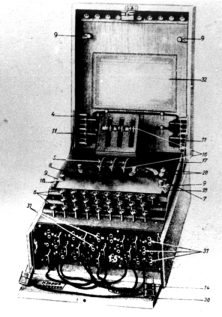
It was about half as long as a football field and contained about 500 miles of wiring. The Harvard-IBM Automatic Sequence Controlled Calculator, or Mark I for short, was an electronic relay computer. It used electromagnetic signals to move mechanical parts. The machine was slow (taking 3-5 seconds per calculation) and inflexible (in that sequences of calculations could not change); but it could perform basic arithmetic as well as more complex equations.
Another computer development spurred by the war was the Electronic Numerical Integrator and Computer (ENIAC), produced by a partnership between the U.S. government and the University of Pennsylvania. Consisting of 18,000 vacuum tubes, 70,000 resistors and 5 million soldered joints, the computer was such a massive piece of machinery that it consumed 160 kilowatts of electrical power, enough energy to dim the lights in an entire section of Philadelphia. Developed by John Presper Eckert (1919-1995) and John W. Mauchly (1907-1980), ENIAC, unlike the Colossus and Mark I, was a general-purpose computer that computed at speeds 1,000 times faster than Mark I.
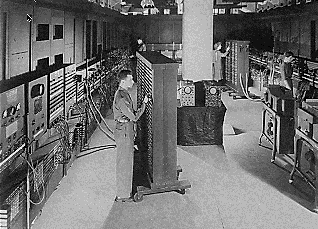
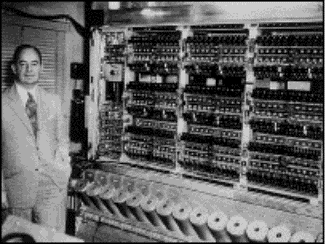
In the mid-1940’s John von Neumann (1903-1957) joined the University of Pennsylvania team, initiating concepts in computer design that remained central to computer engineering for the next 40 years. Von Neumann designed the Electronic Discrete Variable Automatic Computer (EDVAC) in 1945 with a memory to hold both a stored program as well as data. This “stored memory” technique as well as the “conditional control transfer,” that allowed the computer to be stopped at any point and then resumed, allowed for greater versatility in computer programming. The key element to the von Neumann architecture was the central processing unit, which allowed all computer functions to be coordinated through a single source. In 1951, the UNIVAC I (Universal Automatic Computer), built by Remington Rand, became one of the first commercially available computers to take advantage of these advances. Both the U.S. Census Bureau and General Electric owned UNIVACs. One of UNIVAC’s impressive early achievements was predicting the winner of the 1952 presidential election, Dwight D. Eisenhower.
First generation computers were characterized by the fact that operating instructions were made-to-order for the specific task for which the computer was to be used. Each computer had a different binary-coded program called a machine language that told it how to operate. This made the computer difficult to program and limited its versatility and speed. Other distinctive features of first generation computers were the use of vacuum tubes (responsible for their breathtaking size) and magnetic drums for data storage.
Second Generation Computers (1956-1963)
By 1948, the invention of the transistor greatly changed the computer’s development. The transistor replaced the large, cumbersome vacuum tube in televisions, radios and computers. As a result, the size of electronic machinery has been shrinking ever since. The transistor was at work in the computer by 1956. Coupled with early advances in magnetic-core memory, transistors led to second generation computers that were smaller, faster, more reliable and more energy-efficient than their predecessors. The first large-scale machines to take advantage of this transistor technology were early supercomputers, Stretch by IBM and LARC by Sperry-Rand. These computers, both developed for atomic energy laboratories, could handle an enormous amount of data, a capability much in demand by atomic scientists. The machines were costly, however, and tended to be too powerful for the business sector’s computing needs, thereby limiting their attractiveness. Only two LARCs were ever installed: one in the Lawrence Radiation Labs in Livermore, California, for which the computer was named (Livermore Atomic Research Computer) and the other at the U.S. Navy Research and Development Center in Washington, D.C. Second generation computers replaced machine language with assembly language, allowing abbreviated programming codes to replace long, difficult binary codes.
Throughout the early 1960’s, there were a number of commercially successful second generation computers used in business, universities, and government from companies such as Burroughs, Control Data, Honeywell, IBM, Sperry-Rand, and others. These second generation computers were also of solid state design, and contained transistors in place of vacuum tubes. They also contained all the components we associate with the modern day computer: printers, tape storage, disk storage, memory, operating systems, and stored programs. One important example was the IBM 1401, which was universally accepted throughout industry, and is considered by many to be the Model T of the computer industry. By 1965, most large business routinely processed financial information using second generation computers.
It was the stored program and programming language that gave computers the flexibility to finally be cost effective and productive for business use. The stored program concept meant that instructions to run a computer for a specific function (known as a program) were held inside the computer’s memory, and could quickly be replaced by a different set of instructions for a different function. A computer could print customer invoices and minutes later design products or calculate paychecks. More sophisticated high-level languages such as COBOL (Common Business-Oriented Language) and FORTRAN (Formula Translator) came into common use during this time, and have expanded to the current day. These languages replaced cryptic binary machine code with words, sentences, and mathematical formulas, making it much easier to program a computer. New types of careers (programmer, analyst, and computer systems expert) and the entire software industry began with second generation computers.
Third Generation Computers (1964-1971)
Though transistors were clearly an improvement over the vacuum tube, they still generated a great deal of heat, which damaged the computer’s sensitive internal parts. The quartz rock eliminated this problem. Jack Kilby, an engineer with Texas Instruments, developed the integrated circuit (IC) in 1958. The IC combined three electronic components onto a small silicon disc, which was made from quartz. Scientists later managed to fit even more components on a single chip, called a semiconductor. As a result, computers became ever smaller as more components were squeezed onto the chip. Another third-generation development included the use of an operating system that allowed machines to run many different programs at once with a central program that monitored and coordinated the computer’s memory.
Fourth Generation (1971-Present)
After the integrated circuits, the only place to go was down – in size, that is. Large scale integration (LSI) could fit hundreds of components onto one chip. By the 1980’s, very large scale integration (VLSI) squeezed hundreds of thousands of components onto a chip. Ultra-large scale integration (ULSI) increased that number into the millions. The ability to fit so much onto an area about half the size of a U.S. dime helped diminish the size and price of computers. It also increased their power, efficiency and reliability. The Intel 4004 chip, developed in 1971, took the integrated circuit one step further by locating all the components of a computer (central processing unit, memory, and input and output controls) on a minuscule chip. Whereas previously the integrated circuit had had to be manufactured to fit a special purpose, now one microprocessor could be manufactured and then programmed to meet any number of demands. Soon everyday household items such as microwave ovens, television sets and automobiles with electronic fuel injection incorporated microprocessors.
Such condensed power allowed everyday people to harness a computer’s power. They were no longer developed exclusively for large business or government contracts. By the mid-1970’s, computer manufacturers sought to bring computers to general consumers. These minicomputers came complete with user-friendly software packages that offered even non-technical users an array of applications, most popularly word processing and spreadsheet programs. Pioneers in this field were Commodore, Radio Shack and Apple Computers. In the early 1980’s, arcade video games such as Pac Man and home video game systems such as the Atari 2600 ignited consumer interest for more sophisticated, programmable home computers.
In 1981, IBM introduced its personal computer (PC) for use in the home, office and schools. The 1980’s saw an expansion in computer use in all three arenas as clones of the IBM PC made the personal computer even more affordable. The number of personal computers in use more than doubled from 2 million in 1981 to 5.5 million in 1982. Ten years later, 65 million PCs were being used. Computers continued their trend toward a smaller size, working their way down from desktop to laptop computers (which could fit inside a briefcase) to palmtop (able to fit inside a breast pocket). In direct competition with IBM’s PC was Apple’s Macintosh line, introduced in 1984. Notable for its user-friendly design, the Macintosh offered an operating system that allowed users to move screen icons instead of typing instructions. Users controlled the screen cursor using a mouse, a device that mimicked the movement of one’s hand on the computer screen.
As computers became more widespread in the workplace, new ways to harness their potential developed. As smaller computers became more powerful, they could be linked together, or networked, to share memory space, software, information and communicate with each other. As opposed to a mainframe computer, which was one powerful computer that shared time with many terminals for many applications, networked computers allowed individual computers to form electronic co-ops. Using either direct wiring, called a Local Area Network (LAN), or telephone lines, these networks could reach enormous proportions. A global web of computer circuitry, the Internet, for example, links computers worldwide into a single network of information. During the 1992 U.S. presidential election, vice-presidential candidate Al Gore promised to make the development of this so-called “information superhighway” an administrative priority. Though the possibilities envisioned by Gore and others for such a large network are often years (if not decades) away from realization, the most popular use today for computer networks such as the Internet is electronic mail, or E-mail, which allows users to type in a computer address and send messages through networked terminals across the office or across the world.
Fifth Generation (Present and Beyond)
Defining the fifth generation of computers is somewhat difficult because the field is in its infancy. The most famous example of a fifth generation computer is the fictional HAL9000 from Arthur C. Clarke’s novel, 2001: A Space Odyssey. HAL performed all of the functions currently envisioned for real-life fifth generation computers. With artificial intelligence, HAL could reason well enough to hold conversations with its human operators, use visual input, and learn from its own experiences. (Unfortunately, HAL was a little too human and had a psychotic breakdown, commandeering a spaceship and killing most humans on board.)
Though the wayward HAL9000 may be far from the reach of real-life computer designers, many of its functions are not. Using recent engineering advances, computers are able to accept spoken word instructions (voice recognition) and imitate human reasoning. The ability to translate a foreign language is also moderately possible with fifth generation computers. This feat seemed a simple objective at first, but appeared much more difficult when programmers realized that human understanding relies as much on context and meaning as it does on the simple translation of words.
Many advances in the science of computer design and technology are coming together to enable the creation of fifth-generation computers. Two such engineering advances are parallel processing, which replaces von Neumann’s single central processing unit design with a system harnessing the power of many CPUs to work as one. Another advance is superconductor technology, which allows the flow of electricity with little or no resistance, greatly improving the speed of information flow. Computers today have some attributes of fifth generation computers. For example, expert systems assist doctors in making diagnoses by applying the problem-solving steps a doctor might use in assessing a patient’s needs. It will take several more years of development before expert systems are in widespread use.
Personal Computers History and Development
The personal computer (PC) has revolutionized business and personal activities and even the way people talk and think; however, its development has been less of a revolution than an evolution and convergence of three critical elements – thought, hardware, and software. Although the PC traces its lineage to the mainframe and minicomputers of the 1950s and 1960s, the conventional thought that was prevalent during the first thirty years of the computer age saw no value in a small computer that could be used by individuals.
A PC is a microcomputer, so named because it is smaller than a minicomputer, which in turn is smaller than a mainframe computer. While early mainframes and their peripheral devices often took up the floor space of a house, minicomputers are about the size of a refrigerator and stove. The microcomputer, whose modern development traces back to the early 1970s, and fits on a desk.
From the start, the creation of the computer was centered around the concept that a single unit would be used to perform complex calculations with greater speed and accuracy than humans could achieve.
On December 23, 1947, one of the most far-reaching technologies of the 20th Century was developed at Bell Laboratories by John Bardeen, Walter Brattain, and William Shockley – the transistor. But the transistor wasn’t available to U.S. manufacturers until 1956, when a seven year-old antitrust law suit against AT&T, the owners of Bell Labs, was settled. The judgment required that AT&T give away licenses to manufacture the transistor to American companies. Following this decision, the transistor was used to replace thousands of vacuum tubes in computers and began the miniaturization of electronics. Because it drastically reduced the size and heat considerations of the large vacuum tubes, the transistor enabled the computer to become a viable tool for business and government.
From the beginning, computers baffled the populous with their capability. In corporate and government offices and on university campuses, information processing departments sprouted up to serve the computer. The IBM 701, which was introduced in 1952 as a business computer, was comprised of several units that could be shipped and connected at a customer’s location, rather than the earlier massive units that had to be assembled on site. In 1953, IBM began shipping the first mass-produced computer, the IBM 650. IBM introduced the first solid-state (transistorized) computer in 1959, the IBM 7090. Then in 1964, IBM culminated over $1 billion in research when it brought out the System/360 series of computers. Unlike other mainframes, the System/360 computers were compatible with each other.
By 1960, the computer was king. Companies hired armies of technicians and programmers to write its operating programs and software, fix it, and allocate the precious computer time. The capability of the machines was more than a mere mortal could fathom, but gathering raw data and “keying” it in so the computer could “crunch the numbers” was a complicated and time-consuming task.
Frustrations abounded, computer errors were called “glitches,” and the phrases “garbage in/garbage out,” “It’s a computer mistake,” and “Sorry, the computer’s down and we can’t do anything,” were introduced into the lexicon.
On college campuses in the 1960s, students carried bundles of computer cards to and from class, hoping that their share of the valuable computer time would not be bumped or allocated to someone else. The term, “Do not fold, spindle or mutilate,” was coined so people wouldn’t disable the process of feeding the punched computer cards into punch card readers, where the intricate patterns of holes were decoded.
The computer mystique was reinforced in people every time they heard of some new accomplishment. In 1961, a computer calculated the value of pi to 100,000 decimal places. A computer could play checkers, and in 1967 a chess playing computer program was made an honorary member of the United States Chess Federation. Banks began printing checks with magnetic ink so they could be processed by the computers.
Until 1971, nobody even thought of a computer as anything but a big, fast, electronic brain that resided in a climate-controlled room and consumed data and electricity in massive quantities.
In 1971, an Intel 4004 chip containing 4004 transistors was programmed to perform complex mathematical calculations; the hand-held calculator was born. Suddenly, scientists and engineers could carry the computational power of a computer with them to job sites, classrooms, and laboratories; but the hand-held calculator, like the ENIAC before it, was not yet a computer. The microprocessor was developed by Robert Noyce, the founder of Intel and one of the inventors of the integrated circuit, and brought with it a change in the way people worked.
New Technologies and New Ideas
Small, hand-held calculators had provided an idea, or at least a “what if,” to some people. Still, in the early 1970s, computers were used for number crunching and printing out long streams of green and white paper. IBM Selectric typewriters were the top of the line “word processors” and Xerox copiers churned out photocopies. Most people never imagined that a computer could process data in real time, be used to write letters, or fit on a desk.
In 1972, Intel brought out its 8008 chip, capable of processing 8-bits of data, enough to convey numbers and letters of the alphabet. In that same year, Xerox began working on a personal computer at their Palo Alto Research Center. For the next several years, a team of Xerox scientists worked on the “Alto,” a small computer that would have become the first PC if only the development team had been able to convince someone of its usefulness.
Likewise, in 1972 Digital Equipment Corporation (DEC), a minicomputer manufacturing company headed by Kenneth Olsen, had a group of product engineers developing the DEC Datacenter. This PC incorporated not only the computer hardware but the desk as well. The DEC Datacenter could have put tremendous computing capability in the home or at work, but management saw no value to the product and halted its development.
In the end, none of the giant companies whose names had been synonymous with computers would introduce the PC to the world. There seemed to be no future in an inexpensive product that would replace the million dollar “Big Iron” that they were selling as fast as they could make them.
The people who eventually introduced the PC were rebels. Many had spent time in the bowels of the big companies and were frustrated by the lack of vision they encountered. They retreated into their own garages and attended meetings with other “computer nuts” who saw a much different future than the one laid out over the previous 30 years by the giants of the computer industry.
In 1975, Rubik’s Cube was put on store shelves and proved to many that the human brain was incapable of complex problem solving. But a ray of hope also appeared; the first PC was introduced. Micro Instrumentation and Telemetry Systems, Inc. (MITS) sold a kit for the MITS Altair 8800 that enabled computer hobbyists to assemble their own computers. It had no monitor, no keyboard, no printer, and couldn’t store data, but the demand for it, like Rubik’s Cube, was overwhelming.
The Altair proved that a PC was both possible and popular, but only with those people who would spend hours in their basements with soldering irons and wire strippers. The Altair, which looked like a control panel for a sprinkler system, didn’t last, but it helped launch one of the largest companies in the computer world and gave a couple of young software programmers a start. In 1974, Bill Gates and Paul Allen wrote a version of BASIC for the Altair and started a company called Microsoft Corporation.
In 1976, another computer kit was sold to hobbyists – the Apple I. Stephen Wozniak sold his Volkswagen and Steve Jobs sold his programmable calculator to get enough money to start Apple. In 1977, they introduced the Apple II, a pre-assembled PC with a color monitor, sound, and graphics. It was popular, but everyone knew that a serious computer didn’t need any of this. The kits were just a hobby and the Apple II was seen as a toy. Even the Apple name wasn’t a serious, corporate sounding name like IBM, Digital Equipment Corporation, or Control Data.
But 1977 also brought competition. The Zilog Z-80 microprocessor, which had been introduced in 1975, was used in the Tandy Radio Shack TRS-80, affectionately called the “Trash 80.” Apple, Commodore, and Tandy dominated the PC marketplace. The Apple II had 16K bytes of RAM and 16K bytes of ROM; Commodore Business Machines’ Personal Electronic Transactor (PET) included 4K RAM and 14K ROM; and the TRS-80 had 4K RAM and 4K ROM.
Also in 1977, the Central Program for Microprocessors (CP/M) operating system was developed by Digital Research and Gary Kildall. From its introduction until 1980, CP/M was used in most PCs, but even that did not guarantee that a program or document could be written on one machine and read on another because each manufacturer used different floppy disk drives.
Apple introduced the floppy disk drive in 1978, allowing Apple II users to store data on something other than the cumbersome and unreliable tape cassettes that had been used up to that point. But despite the popularity of the three PCs, non-computer people still saw little reason to buy an expensive calculator when there were other ways to do the same things. In 1979, that all changed.
When VisiCalc was introduced for the Apple II, non-computer people suddenly saw a reason to buy a computer. VisiCalc, a spreadsheet program created by Dan Bricklin and Bob Frankston, allowed people to change one number in a budget and watch the effect it had on the entire budget. It was something new and valuable that could only be done with a computer. For thousands of people, the toy, the computer few could find a use for, had been transformed into a device that could actually do something worthwhile.
Microprocessors and high-tech gadgets were gradually worming their way into people’s lives. In 1978, Sony introduced the Beta format video cassette recorder, and a year later the VHS video recorder and the Sony Walkman. And to remind everyone of how far we had to go, Star Trek: The Motion Picture came to theaters in 1979.
The Sinclair ZX-80 PC, which hit the market in 1980, used the same Z-80 chip as Commodore’s PET and the Tandy TRS-80. The ZX-80 had 1K RAM and 4K ROM. Developed by British entrepreneur Clive Sinclair, the ZX-80 meant that people could enter the computer revolution for under $200. Its small size and price attracted people who had never thought about owning a PC.
The Commodore VIC-20, also introduced in 1980, had a color monitor and would eventually become the first PC to sell more than one million units. Even with all of the success the early PC manufacturers had in the late 1970s and early 1980s, the advances in microprocessor speeds, and the creation of software, the PC was still not seen as a serious business tool. Unknown to everyone in the computer industry; however, a huge oak tree was about to drop an acorn that would fall close to the tree and change everything.
Two events occurred in 1981 that would have a tremendous impact on the future of the PC. In 1980, IBM had started a secret project in Boca Raton, Florida called “Acorn.” Thirteen months later, in 1981, IBM introduced the IBM PC, a product that validated the PC as a legitimate business tool. For many people, even those who prided themselves on being able to operate the “Big Iron,” if IBM was making PCs then the small desk-top units were worthy of respect.
When the IBM PC hit the market, it was a compete system. Secretly, IBM had provided software developers with prototypes of their PC so they could develop an array of programs that would be available when the machine hit the streets. IBM also developed printers, monitors, and expansion cards for the PC and made it an open system so other manufacturers could develop peripherals for it.
The IBM PC used an Intel 8088 microprocessor, had 16K of RAM, was expandable to 256K, came with one 5.25-inch disk drive and room for a second, and was available with a choice of operating systems; CP/M-86 or IBM PC-DOS, which had been developed by Microsoft.
The second major event of 1981 was the introduction of the first luggable computer, the Osborne 1. This self-contained, suitcase-sized PC, developed by Adam Osborne, was not only the first portable PC, but also the first to be sold with software. The Osborne I came with BASIC, CBASIC, WordStar for word processing, and the SuperCalc spreadsheet program. Over the next two years, the Osborne Computing Company would go from nothing to a company with $70 million in annual revenue and then into bankruptcy.
Prior to 1980, the most common method of storing data was to connect an audio tape recorder to the PC and dump data to standard tape cassettes. Large word processors and some PCs had 8-inch disk drives, but in 1980 Al Shugart introduced the Winchester hard-disk drive.
Now that the PC had been validated, it began appearing on desk-tops in large and small companies to produce work schedules and payrolls, write letters and memos, and generate budgets. Software enabled people to do more in less time and business was promised the “paperless office” as an added benefit of the PC.
Managers attended classes and began writing memos and letters, but many felt that the work they could now do themselves on a PC was demeaning; it was the work that secretaries and clerks had always done. For some, having a PC on the desk meant that they now had to do the work, not just delegate it, and for others it meant they no longer supervised a person, but a machine.
There was also a strong fear factor. The PCs were expensive and many people were afraid they would damage the units or erase everything in one keystroke. People who had always worked with things they could see and understand were suddenly putting their faith in chips and hard drives that they not only couldn’t see or touch, but they also didn’t understand. Suddenly it was permissible to make a mistake in spelling or grammar; it could be changed and rewritten until it was correct. The whole thought process didn’t set well with some, for others it freed them from the drudgery of using white correction-fluid to cover up mistakes on printed documents.
The early 1980s were a time of furious change in the computer industry. More than 100 companies were manufacturing PCs, each with its own unique features, each with its own software. When IBM entered the market in 1981, software companies knew that writing IBM compatible software would be profitable. Software for the Apple II had exploded to 16,000 titles and IBM would do the same. New software in the 1980s included WordStar, Lotus 1-2-3, Microsoft Word, and Word Perfect.
In 1981, Hayes Micromodem brought the MOdulator/DEModulator (MODEM) to the market for PCs. The modem had been invented at AT&T Bell Labs in 1960 to connect mainframes and minicomputers. Hayes’ modem allowed PCs to communicate with each other and access CompuServe and The Source, the online services that started up in 1979. CompuServe showed people what to do with their 300 baud modems by offering them an array of services and databases to connect with.
In 1982 Compaq introduced the first IBM compatible machine. Until Compaq, most manufacturers feared IBM and would not bring out a machine that was compatible with the PC. Later the compatibles would be termed “clones.”
Also in 1982, Tandy brought out the TRS-80 Model 16, which was based on the Motorola 68000 and Z-80 microprocessors. The Model 16 retailed for $5,000 and included 128K RAM, an 8-inch floppy disk drive, as well as the Xenix operating system, a derivative of UNIX.
In January, 1983 Time magazine anointed the PC as the “Man of the Year,” a designation by the editors that the computer had been the most influential newsmaker of 1982. The magazine estimated 80 million PCs would be in use by the end of the century. Industry leaders included Texas Instruments, Timex, Commodore, Atari, Apple, IBM, and Tandy, with Osborne leading the way in the portable market. The individuals pushing the PC into the future were John Opel at IBM, Adam Osborne of Osborne Computers, VisiCalc creator Dan Bricklin, Jack Tramiel of Commodore, and Clive Sinclair who founded Sinclair Research.
The leading products of 1982 and their sales figures included the Timex/Sinclair 1000 – 600,000; Commodore VIC-20 – over 600,000, Atari 400 and Atari 800 – 600,000; Texas Instruments 99/4A – 530,000; TRS-80 Model III – 300,000; Apple II Plus – 270,000; IBM PC – 200,000; and Osborne 1 – 55,000. These computers ranged in price from the $99 Timex/Sinclair to the Osborne 1 at $1,795 with bundled software. In the opinion of Time, computers priced over $2,000 would appeal to a market of “…growing small businesses and big corporate clients…” Manufacturers of these higher end PCs included Altos, Corvus, Cromemco, Control Data, Digital Equipment, Hewlett-Packard, North Star, Olivetti, Tele Video, Toshiba, Xerox, and Zenith.
But in 1983 there was once again a wind of change blowing across the PC landscape.
In 1983, Apple brought out a machine that failed to sell but nonetheless showed consumers and manufacturers a new direction for the PC. The Lisa, an expensive PC with a graphical user interface (GUI), hit the market with a thud. At $10,000, it had few friends and even fewer buyers.
Also in 1983, IBM introduced IBM XT with a 10MB hard drive, three additional expansion slots, 128K RAM, and a 360K floppy drive. To many buyers, the 10MB storage capacity seemed large enough to last a lifetime.
Immediately after the failure of Lisa, Steven Jobs rethought the machine and in 1984, out came the Macintosh. The Macintosh was powered by Motorola’s 68000 processor and came with 128K of RAM. It was so radically different from any other PC that it split the PC world into two halves that would not be rejoined for another decade. In addition to the GUI that made the computer an “intuitive” extension of the user, the “Mac” had its own operating system that was incompatible with IBM’s MS-DOS system. Suddenly PC meant DOS-based and IBM compatible and Mac meant GUI and mouse.
The Mac was introduced to the world in an extravagant television commercial that was shown only once during half-time of the NFL Super Bowl. The commercial changed the advertising industry almost as much as the Mac changed computing.
Suffering from the failure of the Apple III and Lisa, Apple was literally saved by the Mac. People who hated computers loved the simplicity of Mac. The GUI allowed the user to click a mouse button on an icon to launch a program, print a document, or copy a file. No longer did users have to know combinations of keys or special codes to get the computer to do what they wanted it to do. The Mac was “user friendly.”
Although not the first PC with a mouse or GUI (that distinction went to Xerox’s $50,000 Star that came out in 1981 and immediately failed), the Mac did set the computer world on its ear because of its ease of operation and its operating system.
When Apple came out with the Apple LaserWriter in 1985 it was with Adobe Systems Inc.’s PostScript page description language. By 1986, with its what-you-see-is-what-you-get (WYSIWYG) display and printing, desk-top publishing was born. WYSIWYG meant that a person could format a document with special fonts and spacing and be assured that what came out of the printer would look like what they had created on the screen.
Adobe, founded in 1982 by John Warnock and Charles Geschke, turned the printed page into a graphic image. The bit map made each pixel on the screen a definable image that could be moved and changed without the limitations of a standard text format. PostScript changed the way people thought about fonts, page layout, and the visual impact of the documents they produced with their PC. Printers like the Apple LaserWriter and the Hewlett-Packard HP LaserJet made every document look like it had been professionally typeset and printed.
In 1985, the Commodore Amiga 1000, which featured multitasking, graphics, sound, and video in a windowing operating system, exposed people to multimedia. At the same time Toshiba came out with the T1100 laptop, Tandy introduced the Tandy 200 laptop, and AT&T introduced the UNIX PC. Intel took the microprocessor to a new level when it brought out the 386 microprocessor in 1985, proving that PCs were not only getting better, they were getting faster.
The 1980s were very active times for hardware manufacturers and software producers. Small software companies locked in with either IBM or Macintosh, but large companies like Microsoft were able to create new applications for both operating systems. While Aldus brought out PageMaker, and Lotus introduced Jazz, Microsoft announced Excel for the Mac, C 3.0, and finally shipped a long-awaited program called Windows.
Bill Gates, a founder of Microsoft, tried three times to interest IBM in Windows but was turned down each time. Although the Mac operating system had changed the interface between users and their PCs, many DOS users continued to hang on to their command line-driven MS-DOS operating system, and it would be several more years until the Windows concept caught on.
With the availability of hundreds of software programs, hard disk space became valuable real estate. The 10MB hard disk on the IBM XT began to fill up so hard drive manufacturers started the process of doubling their capacity.
As modems proliferated and the Hayes Smartmodem was accepted as the standard for modems, just about everyone either knew someone they could get online with, subscribed to an online service such as CompuServe, or wanted to access the 1000 host sites on the Internet.
But PCs that were connected to the outside world were also vulnerable to a new phenomenon called viruses. Once downloaded, these programs could attach themselves without warning to a PC’s hard drive and gradually or in the blink of an eye destroy or overwrite files. Virus checkers then became the rage for anyone who received data over telephone lines.
By 1987 enough people were writing their own software and sharing it that the Association of Shareware Professionals was formed to market and protect the inexpensive software. In 1987 a new computer language, C++, stimulated the growth of object-oriented programming (OOP).
For consumers, the late 1980s were a time of frustration. No sooner had they learned to run their new PC and Macs than a new, better, larger, faster model was on the shelf. New versions of software, printers, and modems made it impossible to have the latest of anything.
In 1990, Intel’s 386 and Motorola’s 68030 microprocessors were at the top, then in 1991 Intel brought out the i486SX 20 MHz chip and Motorola introduced the 68040. Less than a year later Intel introduced the 50MHz 486 chip and Tandy brought out its $400 CD-ROM drive for PCs. Then, just to make everyone wonder what was going on, in 1991 Apple and IBM agreed to share technology by integrating the Mac into IBM’s systems and using the IBM Power PC chip.
In 1992, Apple brought out the Apple PowerBook, a laptop that made everyone wonder just how small a full-function computer could get. A year later everyone knew the answer when Apple introduced the Newton Personal Digital Assistant (PDA). The Newton was supposed to be able to recognize hand-written notes and Apple sold 50,000 of them in 10 weeks.
In 1993, Intel introduced the 60MHz Pentium chip, the next generation of chips. The Pentium; however, had a nasty mathematical bug and its acceptance was slowed. Apple discontinued the workhorse of its fleet, the Apple II, which, despite the mind boggling changes in the industry, had lasted 17 years.
Not only were hardware and software obsolete, people were also getting caught up in their own obsolescence. For years, employers had included the operating systems and software names in their advertising for clerical and secretarial positions. As companies used more temporary workers and included both IBM clones and Macintosh’s in their operations, proficiency with only one slammed the door on employment opportunities.
Many people enrolled in classes to learn the latest software or update their computer skills. A good, well-rounded employee needed to know desktop publishing, two or more word processing programs, at least one spreadsheet program, and a graphics package. They had to be able to access the company local area network (LAN), send and receive E-mail using high-speed modems, and solve problems with hardware and software to maximize their output. Microprocessor-driven telephones, cellular phones, and pagers added to the complexity of the job, and repetitive motion syndrome from using keyboards hour after hour created an army of people wearing wrist braces.
Many people left a job where their day was spent working at a computer terminal or PC and went home to enjoy the quite, relaxing camaraderie they found in Internet chat rooms, by visiting the World Wide Web, or reading their favorite newspapers and electronic magazines (ezines).
From its inception in 1975, the PC has become a focal point of business, education, and home life. The microprocessor, an amazing technology when it had 4000 transistors on a single chip, is now even more amazing when it has over 3 billion transistors on an even smaller chip. In 1982, when Time magazine made the computer its “Man of the Year,” the PC was still in its infancy. “Big Iron” still dominated the high-tech environment and having a personal computer was a luxury.
The creation and success of the PC would not have been possible without the elimination of the concept that a computer was a large, centralized, data processor and number cruncher. Today the PC is a communication channel more than it is a computational tool. Millions of people work in their “electronic cottages,” either operating their own business from home or telecommuting to work. It is strange that one of the first Intel 4004 microprocessors ever made, continues to operate and lead the world to the outer edges of time and space. In 1972 one of the small chips was installed in the Pioneer spacecraft. Today it continues to operate over 5 billion miles from earth.
Operating Systems Evolution
The first computers were analog and digital computers made with intricate gear systems by the Greeks. These computers turned out to be too delicate for the technological capabilities of the time and were abandoned as impractical.
The first practical computers were made by the Inca using ropes and pulleys. Knots in the ropes served the purpose of binary digits. The Inca had several of these computers and used them for tax and government records. In addition to keeping track of taxes, the Inca computers held data bases on all of the resources of the Inca empire, allowing for efficient allocation of resources in response to local disasters (storms, drought, earthquakes, etc.). Spanish soldiers acting on orders of Roman Catholic priests destroyed all but one of the Inca computers in the mistaken belief that any device that could give accurate information about distant conditions must be a divination device powered by the Christian “Devil” (and many modern Luddites continue to view computers as Satanically possessed devices).
In the 1800s, the first computers were programmable devices for controlling the weaving machines in the factories of the Industrial Revolution. Created by Charles Babbage, these early computers used Hollerinth (Punch) cards as data storage (the cards contained the control codes for the various patterns). The first computer programmer was Lady Ada, for whom the Ada programming language is named.
In the 1900s, researchers started experimenting with both analog and digital computers using vacuum tubes. Some of the most successful early computers were analog computers, capable of performing advanced calculus problems rather quickly. But the real future of computing was digital rather than analog. Building on the technology and math used for telephone and telegraph switching networks, researchers started building the first electronic digital computers.
In the earliest days of electronic digital computing, everything was done on the bare hardware. Very few computers existed and those that did exist were experimental in nature. The researchers who were making the first computers were also the programmers and the users. They worked directly on the “bare hardware”. There was no operating system. The experimenters wrote their programs in assembly language and a running program had complete control of the entire computer. Debugging consisted of a combination of fixing both the software and hardware, rewriting the object code and changing the actual computer itself.
The lack of any operating system meant that only one person could use a computer at a time. Even in the research lab, there were many researchers competing for limited computing time. The first solution was a reservation system, with researchers signing up for specific time slots.
The high cost of early computers meant that it was essential that the rare computers be used as efficiently as possible. The reservation system was not particularly efficient. If a researcher finished work early, the computer sat idle until the next time slot. If the researcher’s time ran out, the researcher might have to pack up his or her work in an incomplete state at an awkward moment to make room for the next researcher. Even when things were going well, a lot of the time the computer actually sat idle while the researcher studied the results (or studied memory of a crashed program to figure out what went wrong).
The solution to this problem was to have programmers prepare their work off-line on some input medium (often on punched cards, paper tape, or magnetic tape) and then hand the work to a computer operator. The computer operator would load up jobs in the order received (with priority overrides based on politics and other factors). Each job still ran one at a time with complete control of the computer, but as soon as a job finished, the operator would transfer the results to some output medium (punched tape, paper tape, magnetic tape, or printed paper) and deliver the results to the appropriate programmer. If the program ran to completion, the result would be some end data. If the program crashed, memory would be transferred to some output medium for the programmer to study (because some of the early business computing systems used magnetic core memory, these became known as “core dumps”)
Device Drivers And Library Functions
Soon after the first successes with digital computer experiments, computers moved out of the lab and into practical use. The first practical application of these experimental digital computers was the generation of artillery tables for the British and American armies. Much of the early research in computers was paid for by the British and American militaries. Business and scientific applications followed.
As computer use increased, programmers noticed that they were duplicating the same efforts. Every programmer was writing his or her own routines for I/O, such as reading input from a magnetic tape or writing output to a line printer. It made sense to write a common device driver for each input or output device and then have every programmer share the same device drivers rather than each programmer writing his or her own. Some programmers resisted the use of common device drivers in the belief that they could write “more efficient” or faster or ““better” device drivers of their own.
Additionally each programmer was writing his or her own routines for fairly common and repeated functionality, such as mathematics or string functions. Again, it made sense to share the work instead of everyone repeatedly “reinventing the wheel”. These shared functions would be organized into libraries and could be inserted into programs as needed. In the spirit of cooperation among early researchers, these library functions were published and distributed for free, an early example of the power of the open source approach to software development.
UNIX was orginally developed in a laboratory at AT&T’s Bell Labs (now an independent corporation known as Lucent Technologies). At the time, AT&T was prohibited from selling computers or software, but was allowed to develop its own software and computers for internal use. A few newly hired engineers were unable to get valuable mainframe computer time because of lack of seniority and resorted to writing their own operating system (UNIX) and programming language (C) to run on an unused mainframe computer still in the original box (the manufacturer had gone out of business before shipping an operating system).
AT&T’s consent decree with the U.S. Justice Department on monopoly charges was interpreted as allowing AT&T to release UNIX as an open source operating system for academic use. Ken Thompson, one of the originators of UNIX, took UNIX to the University of California, Berkeley, where students quickly started making improvements and modifications, leading to the world famous Berkeley Standard Distribution (BSD) form of UNIX.
UNIX quickly spread throughout the academic world, as it solved the problem of keeping track of many (sometimes dozens) of proprietary operating systems on university computers. With UNIX< all of the computers from many different manufacturers could run the same operating system and share the same programs (recompiled on each processor).
When AT&T settled yet another monopoly case, the company was broken up into “Baby Bells” (the regional companies operating local phone service) and the central company (which had the long distance business and Bell Labs). AT&T (as well as the Baby Bells) was allowed to enter the computer business. AT&T gave academia a specific deadline to stop using “encumbered code” (that is, any of AT&T’s source code anywhere in their versions of UNIX).This led to the development of free open source projects such as FreeBSD, NetBSD, and OpenBSD, as well as commercial operating systems based on the BSD code.
Meanwhile, AT&T developed its own version of UNIX, called System V. Although AT&T eventually sold off UNIX, this also spawned a group of commercial operating systems known as Sys V UNIXes. UNIX quickly swept through the commercial world, pushing aside almost all proprietary mainframe operating systems. Only IBM’s MVS and DEC’s OpenVMS survived the UNIX onslaught.
Vendors such as Sun, IBM, DEC, SCO, and HP modified Unix to differentiate their products. This splintered Unix to a degree, though not quite as much as is usually perceived. Necessity being the mother of invention, programmers have created development tools that help them work around the differences between Unix flavors. As a result, there is a large body of software based on source code that will automatically configure itself to compile on most Unix platforms, including Intel-based Unix. Regardless, Microsoft would leverage the perception that Unix is splintered beyond hope, and present Windows NT as a more consistent multi-platform alternative.
Among the early commercial attempts to deploy UNIX† on desktop computers was AT&T selling UNIX in an Olivetti box running a w74 680×0 assembly language. Microsoft partnered with Xenix to sell their own version of UNIX.w74 Apple computers offered their A/UX version of UNIX running on Macintoshes. None of these early commercial UNIXs was successful. “Unix started out too big and unfriendly for the PC. … It sold like ice cubes in the Arctic. … Wintel emerged as the only ‘safe’ business choice”.
Unix had a limited PC market, almost entirely server-centric. SCO made money on Unix, some of it even from Microsoft. (Microsoft owns 11 percent of SCO, but Microsoft got the better deal in the long run, as it collected money on each unit of SCO Unix sold, due to a bit of code in SCO Unix that made SCO somewhat compatible with Xenix. The arrangement ended in 1997.)”
Why Operating Systems are Needed ?
System software directs the computer in performing tasks that are basic to proper functioning of the system or commonly needed by system users. System software serves as the “middleman” between the computer hardware and application software. The operating system is the set of software routines that sits between the application program and the hardware. All systems have system software: Some more than others, some with more capabilities than others.
Three categories of system programs:
- System operation – software that manages the resources of a computer system.
- System utilization – software that manages or assists users in managing the system operation.
- System implementation – software that assists users in preparing programs for execution.
An operating system is an integrated set of systems programs whose major function:
- Manage resources (CPU, disk, tape, printer, memory, etc.)
- Schedule resources
- Control I/O
- Handle error recovery
- Manage memory
- Manage processor
- Schedule tasks and jobs
- Provides security
- Supplies user commands
At the hardware level
- Computers by different manufacturers are incompatible
- Communicate to peripherals differently
- Handle interrupts differently.
- A program written on one computer will probably not run on another computer.
- If both computers support the same operating system, then this program can be run on both.
- Communication with hardware will be different.
- The interface with application program represents a consistent platform.
A Computer Program
- The application logic
- The user interface (screens, dialogues, etc.)
- The operating system interface (read, write, I/O operation, plus language commands).
- The database interface (the logic to access the database management system).
- The network interface (the logic to access the data communication software).
Functionality
Operating systems can be grouped according to functionality: operating systems for supercomputing, render farms, mainframes, servers, workstations, desktops, handheld devices, real time systems, or embedded systems.
- Supercomputing is primarily scientific computing, usually modeling real systems in nature. Render farms are collections of computers that work together to render animations and special effects. Work that previously required supercomputers can be done with the equivalent of a render farm.
- Mainframes used to be the primary form of computer. Mainframes are large centralized computers. At one time, they provided the bulk of business computing through time-sharing. Mainframes and mainframe replacements (powerful computers or clusters of computers) are still useful for some large scale tasks, such as centralized billing systems, inventory systems, database operations, etc. When mainframes were in widespread use, there was also a class of computers known as minicomputers which were smaller, less expensive versions of mainframes for businesses that couldn’t afford true mainframes.
- Servers are computers or groups of computers used for internet serving, intranet serving, print serving, file serving, and/or application serving. Servers are also sometimes used as mainframe replacements.
- Desktop operating systems are used for personal computers.
- Workstations are more powerful versions of personal computers. Often only one person uses a particular workstation (like desktops) and workstations often run a more powerful version of a desktop operating system, but workstations run on more powerful hardware and often have software associated with larger computer systems.
- Hand held operating systems are much smaller and less capable than desktop operating systems, so that they can fit into the limited memory of hand held devices.
- Real time operating systems (RTOS) are specifically designed to respond to events that happen in real time. This can include computer systems that run factory floors, computer systems for emergency room or intensive care unit equipment (or even the entire ICU), computer systems for air traffic control, or embedded systems. RTOSs are grouped according to the response time that is acceptable (seconds, milliseconds, microseconds) and according to whether or not they involve systems where failure can result in loss of life.
- Embedded systems are combinations of processors and special software that are inside of another device, such as the electronic ignition system on cars.
Proprietary vs. UNIX
In the early days of computing, each manufacturer created their own custom operating system(s). There was competition in features of both the operating system and the underlying hardware.
After AT&T was forced to abandon commercial computing as part of an antitrust settlement, AT&T’s UNIX was made available for free to the academic community. Because UNIX had been designed in a way that made it easy to “port” (move) to new hardware, colleges and universities that switched to UNIX were able to run a single operating system on all of their computers, even if their computers came from multiple manufacturers.
Eventually UNIX spread into the business community, and pushed aside almost all proprietary mainframe and minicomputer operating systems. Only IBM’s MVS and DEC’s OpenVMS survived in common use (MVS because of the sheer number of installations using it and OpenVMS in the banking and financial community because of its high reliability, security, and preservation of data). Even IBM and DEC ended up offering their own versions of UNIX as well as their proprietary operating systems.
In a reintroduction of the “Tower of Babel”, manufacturers once again competed in features, offering platform-specific enhancements to their versions of UNIX. MIS managers were faced with the choice of using these custom features and being locked into a specific manufacturer’s version of UNIX or foregoing the advanced features and limiting themselves to generic UNIX facilities.
With the introduction of microprocessors and personal computers, once again manufacturers each produced their own custom proprietary operating systems for their hardware, often changing operating systems with each new generation of hardware. Commodore and Apple introduced semi-graphical operating systems for the Commodore PET and C64 and the Apple ][. Digital Research introduced CP/M, a simple business-oriented operating system that ran on multiple manufacturer’s computers.
Moving beyond the early hobbyist days, Commodore (Amiga), Atari (GEM), and Apple (Lisa and Macintosh) introduced fully graphic user interfaces. Microsoft introduced a bad copy of CP/M, known as MS-DOS or PC-DOS, and then later introduced a bad copy of the Macintosh known as Windows.
The strong point of these desktop operating systems was the graphic user interface, which opened up the computer to the masses, no longer demanding that computer users be mathematically competent by eliminating the text command line. While the Amiga and Atari’s GEM had very solid underpinnings, the Macintosh and Windows have always had weak underpinnings, which typically manifests as system crashes and various mysterious events. The Amiga slowly dwindled in popularity due to gross mismanagement by Commodore executives, while Atari’s GEM was a victim of Atari’s financial troubles. Microsoft has repeatedly tried to fix the underpinnings of Windows, with Windows 95, Windows 98, Windows NT, and Windows 2000, but never with success. Apple also tried to fix the underpinnings of the Macintosh, first with Copeland (never released, although parts of it appeared in Mac OS 8), and now with Mac OS X. With Mac OS X, Apple took an already working workstation UNIX (NeXT) and have been attempting to place the Macintosh user interface on top. So far it looks as if Apple will be providing a high quality UNIX, but at the sacrifice of basic user interface capability, which may make Mac OS X too difficult for the non-engineer to use. With OS/2, IBM succeeded in creating a personal computer operating system that had both a sophisticated graphic user interface and high quality underpinnings, but Microsoft used what were later declared illegal tactics to prevent OS/2 from becoming popular.
For almost as long as there have been microprocessors, there have been variations of UNIX available for them (Apple even provided its own version of UNIX for the Macintosh hardware), including the BSD projects (FreeBSD, NetBSD, OpenBSD). With LINUX, a UNIX-like operating system took off in popularity.
LINUX started as an alternative operating system to Windows, coordinated by Linus Torvalds, at the time an engineering student. With the cooperation of literally tens of thousands of volunteer programmers, Linux grew into a powerful server and workstation operating system. Two groups (KDE and GNOME) are in the process of building modern graphic user interfaces for Linux. Already, their work has progressed to the point that after some initial set-up hassles, many non-technical people can use Linux. It is reasonable to expect that soon Linux will match or surpass the graphic user interface sophistication of Windows. And because of the way that KDE and GNOME are being written (as open source projects using standard UNIX interfaces), both graphic shells can be (and already are being) used on just about any UNIX system, including the free BSDs. Once again, UNIX sweeps aside most proprietary operating systems.
Free UNIXs
There are four major free, open source UNIX projects: LINUX, FreeBSD, NetBSD, and OpenBSD. The three different BSD projects started because the original design and programming teams had personality conflicts and couldn’t all work together. LINUX was started by a college student who didn’t know of the existence of the BSD projects.
The basic difference between the BSD projects and LINUX, is that each BSD project has a tightly controlled design, while LINUX is very free-form. In most cases, the four operating systems are interchangeable. The three BSDs share a great deal of source code with each other. Most software written for one of the four operating systems will run on the other three with little or no modification. One of the three BSDs is the operating system of choice where reliability is critical (because of the tightly controlled design). LINUX is the operating system of choice for hobbyists who want to experiment with and tweak their personal copy.
Where computers are headed
After two decades of supplying boring beige boxes, PC makers have begun to add a bit of color and style to their lines, following the runaway success of Apple’s iMac line, a candy-colored machine designed for consumers that was not simply a repackaged business box. Industrial design isn’t the only selling point. A fundamental shift in computing has occurred. For business users and consumers alike, what matters is being connected to the Web, not the raw processing power of the desktop computer. The most intriguing new technologies aren’t spreadsheets or word-processing programs, or the latest updates to Windows. Digital photography, digital music, desktop video editing, and high speed internet access are where the action is. A top-flight desktop computer or notebook is nice to have, but what makes that technology really rock is all the gear that goes with it. Computer manufacturers have altered their product lines in recognition of that trend. Apple’s top-end consumer model, the iMac DV Special Edition, comes with a stellar sound system, high-speed FireWire ports for transferring video, and the company’s iMovie software for editing movies. Sony has a similar strategy with VAIO desktop models configured for video editing that sport a huge hard drive, high-speed i.LINK [FireWire] ports, and dual CD/DVD drives. The most expensive notebook models now rival desktop machines for speed and versatility. Except for Apple’s eye-catching iBook, however, most notebooks are designed for business users.
Internet History and Development
The Internet has revolutionized the computer and communications world like nothing before. The invention of the telegraph, telephone, radio, and computer set the stage for this unprecedented integration of capabilities. The Internet is at once a world-wide broadcasting capability, a mechanism for information dissemination, and a medium for collaboration and interaction between individuals and their computers without regard for geographic location.
The Internet represents one of the most successful examples of the benefits of sustained investment and commitment to research and development of information infrastructure. Beginning with the early research in packet switching, the government, industry and academia have been partners in evolving and deploying this exciting new technology. Today, terms like “bleiner@computer.org” and “http://www.acm.org” trip lightly off the tongue of the random person on the street. 1
This is intended to be a brief, necessarily cursory and incomplete history. Much material currently exists about the Internet, covering history, technology, and usage. A trip to almost any bookstore will find shelves of material written about the Internet. 2In this paper, 3 several of us involved in the development and evolution of the Internet share our views of its origins and history. This history revolves around four distinct aspects. There is the technological evolution that began with early research on packet switching and the ARPANET (and related technologies), and where current research continues to expand the horizons of the infrastructure along several dimensions, such as scale, performance, and higher level functionality. There is the operations and management aspect of a global and complex operational infrastructure. There is the social aspect, which resulted in a broad community of Internauts working together to create and evolve the technology. And there is the commercialization aspect, resulting in an extremely effective transition of research results into a broadly deployed and available information infrastructure.
The Internet today is a widespread information infrastructure, the initial prototype of what is often called the National (or Global or Galactic) Information Infrastructure. Its history is complex and involves many aspects – technological, organizational, and community. And its influence reaches not only to the technical fields of computer communications but throughout society as we move toward increasing use of online tools to accomplish electronic commerce, information acquisition, and community operations.
The first recorded description of the social interactions that could be enabled through networking was a series of memos written by J.C.R. Licklider of MIT in August 1962 discussing his “Galactic Network” concept. He envisioned a globally interconnected set of computers through which everyone could quickly access data and programs from any site. In spirit, the concept was very much like the Internet of today. Licklider was the first head of the computer research program at DARPA, 4 starting in October 1962. While at DARPA he convinced his successors at DARPA, Ivan Sutherland, Bob Taylor, and MIT researcher Lawrence G. Roberts, of the importance of this networking concept.
Leonard Kleinrock at MIT published the first paper on packet switching theory in July 1961 and the first book on the subject in 1964. Kleinrock convinced Roberts of the theoretical feasibility of communications using packets rather than circuits, which was a major step along the path towards computer networking. The other key step was to make the computers talk together. To explore this, in 1965 working with Thomas Merrill, Roberts connected the TX-2 computer in Mass. to the Q-32 in California with a low speed dial-up telephone line creating the first (however small) wide-area computer network ever built. The result of this experiment was the realization that the time-shared computers could work well together, running programs and retrieving data as necessary on the remote machine, but that the circuit switched telephone system was totally inadequate for the job. Kleinrock’s conviction of the need for packet switching was confirmed.
In late 1966 Roberts went to DARPA to develop the computer network concept and quickly put together his plan for the “ARPANET”, publishing it in 1967. At the conference where he presented the paper, there was also a paper on a packet network concept from the UK by Donald Davies and Roger Scantlebury of NPL. Scantlebury told Roberts about the NPL work as well as that of Paul Baran and others at RAND. The RAND group had written a paper on packet switching networks for secure voice in the military in 1964. It happened that the work at MIT (1961-1967), at RAND (1962-1965), and at NPL (1964-1967) had all proceeded in parallel without any of the researchers knowing about the other work. The word “packet” was adopted from the work at NPL and the proposed line speed to be used in the ARPANET design was upgraded from 2.4 kbps to 50 kbps. 5
In August 1968, after Roberts and the DARPA funded community had refined the overall structure and specifications for the ARPANET, an RFQ was released by DARPA for the development of one of the key components, the packet switches called Interface Message Processors (IMP’s). The RFQ was won in December 1968 by a group headed by Frank Heart at Bolt Beranek and Newman (BBN). As the BBN team worked on the IMP’s with Bob Kahn playing a major role in the overall ARPANET architectural design, the network topology and economics were designed and optimized by Roberts working with Howard Frank and his team at Network Analysis Corporation, and the network measurement system was prepared by Kleinrock’s team at UCLA. 6
Due to Kleinrock’s early development of packet switching theory and his focus on analysis, design and measurement, his Network Measurement Center at UCLA was selected to be the first node on the ARPANET. All this came together in September 1969 when BBN installed the first IMP at UCLA and the first host computer was connected. Doug Engelbart’s project on “Augmentation of Human Intellect” (which included NLS, an early hypertext system) at Stanford Research Institute (SRI) provided a second node. SRI supported the Network Information Center, led by Elizabeth (Jake) Feinler and including functions such as maintaining tables of host name to address mapping as well as a directory of the RFC’s. One month later, when SRI was connected to the ARPANET, the first host-to-host message was sent from Kleinrock’s laboratory to SRI. Two more nodes were added at UC Santa Barbara and University of Utah. These last two nodes incorporated application visualization projects, with Glen Culler and Burton Fried at UCSB investigating methods for display of mathematical functions using storage displays to deal with the problem of refresh over the net, and Robert Taylor and Ivan Sutherland at Utah investigating methods of 3-D representations over the net. Thus, by the end of 1969, four host computers were connected together into the initial ARPANET, and the budding Internet was off the ground. Even at this early stage, it should be noted that the networking research incorporated both work on the underlying network and work on how to utilize the network. This tradition continues to this day.
Computers were added quickly to the ARPANET during the following years, and work proceeded on completing a functionally complete Host-to-Host protocol and other network software. In December 1970 the Network Working Group (NWG) working under S. Crocker finished the initial ARPANET Host-to-Host protocol, called the Network Control Protocol (NCP). As the ARPANET sites completed implementing NCP during the period 1971-1972, the network users finally could begin to develop applications.
In October 1972 Kahn organized a large, very successful demonstration of the ARPANET at the International Computer Communication Conference (ICCC). This was the first public demonstration of this new network technology to the public. It was also in 1972 that the initial “hot” application, electronic mail, was introduced. In March Ray Tomlinson at BBN wrote the basic email message send and read software, motivated by the need of the ARPANET developers for an easy coordination mechanism. In July, Roberts expanded its utility by writing the first email utility program to list, selectively read, file, forward, and respond to messages. From there email took off as the largest network application for over a decade. This was a harbinger of the kind of activity we see on the World Wide Web today, namely, the enormous growth of all kinds of “people-to-people” traffic.
The Initial Internetting Concepts
The original ARPANET grew into the Internet. Internet was based on the idea that there would be multiple independent networks of rather arbitrary design, beginning with the ARPANET as the pioneering packet switching network, but soon to include packet satellite networks, ground-based packet radio networks and other networks. The Internet as we now know it embodies a key underlying technical idea, namely that of open architecture networking. In this approach, the choice of any individual network technology was not dictated by a particular network architecture but rather could be selected freely by a provider and made to interwork with the other networks through a meta-level “Internetworking Architecture”. Up until that time there was only one general method for federating networks. This was the traditional circuit switching method where networks would interconnect at the circuit level, passing individual bits on a synchronous basis along a portion of an end-to-end circuit between a pair of end locations. Recall that Kleinrock had shown in 1961 that packet switching was a more efficient switching method. Along with packet switching, special purpose interconnection arrangements between networks were another possibility. While there were other limited ways to interconnect different networks, they required that one be used as a component of the other, rather than acting as a peer of the other in offering end-to-end service.
In an open-architecture network, the individual networks may be separately designed and developed and each may have its own unique interface which it may offer to users and/or other providers. including other Internet providers. Each network can be designed in accordance with the specific environment and user requirements of that network. There are generally no constraints on the types of network that can be included or on their geographic scope, although certain pragmatic considerations will dictate what makes sense to offer.
The idea of open-architecture networking was first introduced by Kahn shortly after having arrived at DARPA in 1972. This work was originally part of the packet radio program, but subsequently became a separate program in its own right. At the time, the program was called “Internetting”. Key to making the packet radio system work was a reliable end-end protocol that could maintain effective communication in the face of jamming and other radio interference, or withstand intermittent blackout such as caused by being in a tunnel or blocked by the local terrain. Kahn first contemplated developing a protocol local only to the packet radio network, since that would avoid having to deal with the multitude of different operating systems, and continuing to use NCP.
However, NCP did not have the ability to address networks (and machines) further downstream than a destination IMP on the ARPANET and thus some change to NCP would also be required. (The assumption was that the ARPANET was not changeable in this regard). NCP relied on ARPANET to provide end-to-end reliability. If any packets were lost, the protocol (and presumably any applications it supported) would come to a grinding halt. In this model NCP had no end-end host error control, since the ARPANET was to be the only network in existence and it would be so reliable that no error control would be required on the part of the hosts.
Thus, Kahn decided to develop a new version of the protocol, which could meet the needs of an open-architecture network environment. This protocol would eventually be called the Transmission Control Protocol/Internet Protocol (TCP/IP). While NCP tended to act like a device driver, the new protocol would be more like a communications protocol.
Four ground rules were critical to Kahn’s early thinking:
- Each distinct network would have to stand on its own and no internal changes could be required to any such network to connect it to the Internet.
- Communications would be on a best effort basis. If a packet didn’t make it to the final destination, it would shortly be retransmitted from the source.
- Black boxes would be used to connect the networks; these would later be called gateways and routers. There would be no information retained by the gateways about the individual flows of packets passing through them, thereby keeping them simple and avoiding complicated adaptation and recovery from various failure modes.
- There would be no global control at the operations level.
Other key issues that needed to be addressed were:
- Algorithms to prevent lost packets from permanently disabling communications and enabling them to be successfully retransmitted from the source.
- Providing for host to host “pipelining” so that multiple packets could be end route from source to destination at the discretion of the participating hosts, if the intermediate networks allowed it.
- Gateway functions to allow it to forward packets appropriately. This included interpreting IP headers for routing, handling interfaces, breaking packets into smaller pieces if necessary, etc.
- The need for end-end checksums, reassemble of packets from fragments and detection of duplicates, if any.
- The need for global addressing
- Techniques for host to host flow control.
- Interfacing with the various operating systems
- There were also other concerns, such as implementation efficiency, internetwork performance, but these were secondary considerations at first.
Kahn began work on a communications-oriented set of operating system principles while at BBN and documented some of his early thoughts in an internal BBN memorandum entitled “Communications Principles for Operating Systems”. At this point he realized it would be necessary to learn the implementation details of each operating system to have a chance to embed any new protocols in an efficient way. Thus, in the spring of 1973, after starting the internetting effort, he asked Vint Cerf (then at Stanford) to work with him on the detailed design of the protocol. Cerf had been intimately involved in the original NCP design and development and already had the knowledge about interfacing to existing operating systems. So armed with Kahn’s architectural approach to the communications side and with Cerf’s NCP experience, they teamed up to spell out the details of what became TCP/IP.
The give and take was highly productive and the first written version 7 of the resulting approach was distributed at a special meeting of the International Network Working Group (INWG) which had been set up at a conference at Sussex University in September 1973. Cerf had been invited to chair this group and used the occasion to hold a meeting of INWG members who were heavily represented at the Sussex Conference.
Some basic approaches emerged from this collaboration between Kahn and Cerf:
- Communication between two processes would logically consist of a very long stream of bytes (they called them octets). The position of any octet in the stream would be used to identify it.
- Flow control would be done by using sliding windows and acknowledgments (acks). The destination could select when to acknowledge and each ack returned would be cumulative for all packets received to that point.
- It was left open as to exactly how the source and destination would agree on the parameters of the windowing to be used. Defaults were used initially.
- Although Ethernet was under development at Xerox PARC at that time, the proliferation of LANs were not envisioned at the time, much less PCs and workstations. The original model was national level networks like ARPANET of which only a relatively small number were expected to exist. Thus a 32 bit IP address was used of which the first 8 bits signified the network and the remaining 24 bits designated the host on that network. This assumption, that 256 networks would be sufficient for the foreseeable future, was clearly in need of reconsideration when LANs began to appear in the late 1970s.
The original Cerf/Kahn paper on the Internet described one protocol, called TCP, which provided all the transport and forwarding services in the Internet. Kahn had intended that the TCP protocol support a range of transport services, from the totally reliable sequenced delivery of data (virtual circuit model) to a datagram service in which the application made direct use of the underlying network service, which might imply occasional lost, corrupted or reordered packets.
However, the initial effort to implement TCP resulted in a version that only allowed for virtual circuits. This model worked fine for file transfer and remote login applications, but some of the early work on advanced network applications, in particular packet voice in the 1970s, made clear that in some cases packet losses should not be corrected by TCP, but should be left to the application to deal with. This led to a reorganization of the original TCP into two protocols, the simple IP which provided only for addressing and forwarding of individual packets, and the separate TCP, which was concerned with service features such as flow control and recovery from lost packets. For those applications that did not want the services of TCP, an alternative called the User Datagram Protocol (UDP) was added in order to provide direct access to the basic service of IP.
A major initial motivation for both the ARPANET and the Internet was resource sharing – for example allowing users on the packet radio networks to access the time sharing systems attached to the ARPANET. Connecting the two together was far more economical that duplicating these very expensive computers. However, while file transfer and remote login (Telnet) were very important applications, electronic mail has probably had the most significant impact of the innovations from that era. Email provided a new model of how people could communicate with each other, and changed the nature of collaboration, first in the building of the Internet itself (as is discussed below) and later for much of society.
There were other applications proposed in the early days of the Internet, including packet based voice communication (the precursor of Internet telephony), various models of file and disk sharing, and early “worm” programs that showed the concept of agents (and, of course, viruses). A key concept of the Internet is that it was not designed for just one application, but as a general infrastructure on which new applications could be conceived, as illustrated later by the emergence of the World Wide Web. It is the general purpose nature of the service provided by TCP and IP that makes this possible.
HTTP (Hyper-Text Transmission Protocol) uses the Internet TCP/IP protocol stack. All information you read or write on the Web is sent across the Net in TCP/IP packets. A TCP connection is really like a responsible courier getting around in a big city (the Net) – it makes sure the data you send and receive reaches the final destination reliably while avoiding traffic jams and allowing other people to get through as well. The funny thing is that TCP drives an old car – it takes time for it to warm up, and as soon as it is done, it cools off again very quickly.
To function efficiently, HTTP must take advantage of TCP/IP’s strengths and avoid its weaknesses, something that HTTP/1.0 does not do very well. Whenever a client accesses a document, an image, a sound bite etc. HTTP/1.0 creates a new TCP connection and as soon as it is done, it is immediately dismissed and never reused. As a result, TCP rarely has time to get warm leaving lots of “cold cars” with little data creating a lot of traffic jams.
HTTP/1.1 fixes this in two ways. First, it allows the client to reuse the same TCP connection (persistent connections) again and again when talking to the same server. Second, it makes sure that the courier carries as much information as possible (pipelining) so that it doesn’t have to run back and forth as much. That is, not only does HTTP/1.1 use less TCP connections, it also makes sure that they are better used. The result is less traffic jam and faster delivery.
Efficient Caching
Documents you read on the Web are often read by thousands and even millions of other people at the same time. This of course keeps servers very busy. Imagine that instead of having everybody talking to the same server people could get the same information much closer to where they are. This is what caching allows us to do.
Whereas HTTP/1.0 merely enabled caching, it did not specify any well-defined rules describing how a cache should interact with clients or with origin servers. The lack of control resulted in that most content providers and users did not trust the HTTP/1.0 caching model and instead tried to short-circuit it. The result was that many busy parts of the Internet were bogged down even more. A major part of the HTTP/1.1 specification is devoted to providing a well-defined caching model which allows both servers and clients to control the level of cachability and the conditions under which the cache should update its contents.
Digest Authentication
Another important part of HTTP/1.1 is the Digest Authentication Specification. Digest authentication allows users to authenticate themselves to a server without sending their passwords in clear text which can be sniffed by anybody listening on the network. In HTTP/1.0, passwords are sent without being encrypted using so-called basic authentication. Although not providing real security, Digest Authentication is an important step in a making the Web a more secure place to live.
The HTTP History
- Version 0.9- raw data. There was no differentiation between pictures and text. This could be confusing at times, and hard work for the browser.
- Version 1.0- Typing and negotiation of data representation- MIME types
- Version 1.1- Improved to allow for (amongst other things) :
- persistent connections
- chunked-encoding (to indicate when connection is over)
- caching
- proxy support
- virtual hosts
- pipelining
The HTTP Extension Framework
A continuing area of interest is how HTTP can be extended according to the needs of specific applications. HTTP has been extended locally, as well as globally, in ways that few could have predicted. Current efforts span an enormous range, including distributed authoring, collaboration, printing, and remote procedure call mechanisms. The usual practice is to add new header fields to the protocol, and rely on the software at the other end to recognize the header and process it accordingly. This, however, is the equivalent of relying on magic! A standard framework for defining extensions has for some time been badly needed.
The HTTP Extension Framework provides a simple yet powerful mechanism for extending HTTP. The Framework enables authors to introduce extensions in a systematic manner: programmers will be able to specify which extensions are introduced along with information about who the recipient is, and how the recipient should deal with them
HTTP Related Protocols
This is a small sample of other Internet transfer protocols and information representation protocols.
- IMAP
The Internet Message Access Protocol, Version 4rev1 (IMAP4rev1) allows a client to access and manipulate electronic mail messages on a server. IMAP4rev1 permits manipulation of remote message folders, called “mailboxes”, in a way that is functionally equivalent to local mailboxes. IMAP4rev1 also provides the capability for an offline client to resynchronize with the server.
IMAP4rev1 includes operations for creating, deleting, and renaming mailboxes; checking for new messages; permanently removing messages; setting and clearing flags; [RFC-822] and [MIME-IMB] parsing; searching; and selective fetching of message attributes, texts, and portions thereof. Messages in IMAP4rev1 are accessed by the use of numbers. These numbers are either message sequence numbers or unique identifiers.
- MIME
RFC 822 defines a message representation protocol which specifies considerable detail about message headers, but which leaves the message content, or message body, as flat ASCII text. MIME redefines the format of message bodies to allow multi-part textual and non-textual message bodies to be represented and exchanged without loss of information. This is based on earlier work documented in RFC 934 and RFC 1049, but extends and revises that work. Because RFC 822 said so little about message bodies, this document is largely orthogonal to (rather than a revision of) RFC 822.
- File Transfer Protocol (FTP)
The file transfer protocol currently most used for accessing fairly stable public information over a wide area is “Anonymous FTP”. This means the use of the internet File Transfer Protocol without authentication. As the WWW project currently operates for the sake of public information, anonymous FTP is quite appropriate, and WWW can pick up any information provided by anonymous FTP. FTP is defined in RFC 959 which includes material from many previous RFCs. (See also: file address syntax ). Directories are browsed as hypertext. The browser will notice references to files which are in fact accessible as locally mounted (or on DECnet on VMS systems) and use direct access instead.
Network News Protocol
The “Network News Transfer Protocol” (NNTP) is defined in RFC 977 by Kantor and Lampsley. This allows transient news information in the USENET news format to be exchanged over the internet. The format of news articles is defined in RFC 850, Standard for Interchange of USENET Messages by Mark Horton. This in turn refers to the standard RFC 822 which defines the format of internet mail messages. News articles make good examples of hypertext, as articles contain references to other articles and news groups. News groups appear like directories, but more informative.
- Gopher
The Gopher distributed information system uses a lightweight protocol very similar to HTTP. Therefore, it is now included in every WWW client, so that the Gopher world can be browsed as part of the Web. Gopher menus are easily mapped onto hypertext links. It may be that future versions of the Gopher and HTTP protocols will converge.
- Z39.50
With the use of the freeWAIS software from CNIDR, the W3 software now accesses WAIS servers directly. WAIS is a variant of the z39.50 protocol. This is being developed from earlier versions which did not have the functionality required for NIR. — see draft standards documents .
The Web owes its origins to many people, starting back in medieval times with the development of a rich system of cross references and marginalia. The basic document model for the Web was set: things in the page such as the text and graphics, and cross references to other works. These early hypertext links were able to able to target documents to a fine level thanks to conventions for numbering lines or verses.
Vannevar Bush in the 1940’s, in his article As we may think, describes his vision for a computer aided hypertext system he named the memex. His vivid description of browsing the Web of linked information, includes the ability to easily insert new information of your own, to add to the growing web. Dr. Bush was the Director of the US Office of Scientific Research and Development, and coordinated war time research in the application of science to war.
Other visionaries include Douglas Engelbart, who founded the Augmentation Research Center at the Stanford Research Institute (SRI) in 1963. He is widely credited with helping to develop the computer mouse, hypertext, groupware and many other seminal technologies. He now directs the Bootstrap Institute, which is dedicated to the development of collective IQ in networked communities.
Ted Nelson has spent his life promoting a global hypertext system called Xanadu. He coined the term hypertext, and is well known for his books: Literary Machines and Dream Machines, which describe hypermedia including branching movies, such as the film at the Czechoslovakian Pavilion at Expo `67.
The ACM SIGWEB, formerly SIGLINK, has for many years been the center for academic research into hypertext systems, sponsoring a series of annual conferences. SIGLINK was formed in 1989 following a workshop on hypertext, held in 1987 in Chapel Hill, North Carolina.
Bill Atkinson best known for MacPaint, an easy to use bitmap painting program, gave the world its first popular hypertext system HyperCard. Released in 1987, HyperCard made it easy for anyone to create graphical hypertext applications. It features bitmapped graphics, form fields, scripting and fast full text search. HyperCard is based on a stack of cards metaphor with shared backgrounds. It spawned imitators such as Asymmetrix Toolbook which used drawn graphics and ran on the PC. The OWL Guide was the first professional hypertext system for large scale applications, it predates HyperCard by one year and followed in the footsteps made by Xerox NoteCards, a Lisp-based hypertext system, released in 1985.
Tim Berners-Lee and Robert Caillau both worked at CERN, an international high energy physics research center near Geneva. In 1989 they collaborated on ideas for a linked information system that would be accessible across the wide range of different computer systems in use at CERN. At that time many people were using TeX and PostScript for their documents. A few were using SGML. Tim realized that something simpler was needed that would cope with dumb terminals through high end graphical X Window workstations. HTML was conceived as a very simple solution, and matched with a very simple network protocol HTTP.
CERN launched the Web in 1991 along with a mailing list called www-talk. Other people thinking along the same lines soon joined and helped to grow the web by setting up Web sites and implementing browsers, such as, Cello, Viola, and MidasWWW. The break through came when the National Center for Supercomputer Applications (NCSA) at Urbana-Champaign encouraged Marc Andreessen and Eric Bina to develop the X Window Mosaic browser. It was later ported to PCs and Macs and became a run-away success story. The Web grew exponentially, eclipsing other Internet based information systems such as WAIS, Hytelnet, Gopher, and UseNet.
This section provides an outline of events that comprise the history of the Internet. Each event is presented individually and its significance is assumed to be self-evident. A detailed historical treatment of each event is beyond the scope of this section and has no direct relevance to the history of the World Wide Web. While the section may lack in continuity, the items contained here are too diverse and disjoint to be put in narrative format in any cohesive fashion. Most of the contents of this section are based on [Zakon].
It all began a long long time ago. 1858 actually…
| 1858 The “Atlantic cable” was installed across the ocean with the idea of connecting the communication systems in US and Europe. While this was a great idea, the 1858 implementation of it was only operational for a few days.The implementation was attempted again in 1866, and this time with great success. The original Atlantic cable laid in 1866 remained operational for almost 100 years. |
| 1957 In 1957, the Soviet Union launched Sputnik. As a response to the Soviet research efforts, president Dwight D. Eisenhower instructed the Department of Defense to establish the Advanced Research Projects Agency or ARPA. The agency started with great success and launched the first American satellite within 18 months of the agency’s conception. Several years later, ARPA was also given the task of developing a reliable communications network, specifically for use by computers. The primary motivation for this was to have a network of decentralized military computers connected in such way that in the case of destruction of one or several nodes in a potential war, the network would still survive with communication lines between remaining nodes.In 1962 Dr. J.C.R. Licklider was given the task of leading ARPA’s research efforts in improving the use of computer technology in the military. It was due to Dr. Licklider’s influence that ARPA’s primary research efforts moved from the private sector to the universities around the US. His work paved the way for the creation of ARPANET. |
| 1962 Paul Baran of RAND Corporation publishes the paper “On Distributed Communications Networks” which introduces Packet-switching (PS) networks; no single outage point. |
| 1965 ARPA sponsors study on “cooperative network of time-sharing computers” — TX-2 at MIT Lincoln Lab and Q-32 at System Development Corporation (Santa Monica, CA) are directly linked (without packet switches). |
| 1967 At the ACM Symposium on Operating Principles, a plan was presented for a packet-switching network. Also, the first design paper on ARPANET was published by Lawrence G. Roberts. |
| 1968 PS-network was presented to the Advanced Research Projects Agency (ARPA).It is argued that the first packet-switching network was operational and in-place at the National Physical Laboratories in the UK. Parallel efforts in France also resulted in an early packet-switching network at Societe Internationale de Telecommunications Aeronautiques in 1968-1970. |
| 1969 First ARPANET node was established at UCLA’s Network Measurements Center.Subsequent nodes were established at Stanford Research Institute (SRI), University of Utah in Salt Lake City, and UCSB (UC Santa Barbara).Information Message Processors (IMP) was developed by Bolt Beranek on a Honeywell DDP 516. The system delivered messages between the 4 node network above.First RFC (Request For Comments), “Host Software”, was submitted by Steve Crocker. |
| 1970 Norman Abrahamson develops ALOHAnet at University of Hawaii. ALOHAnet provided the background for the work which later became Ethernet.ARPANET hosts start using Network Control Protocol (NCP). This protocol was used until 1982 at which time it was replaced with TCP/IP. |
| 1971 ARPANET had grown to 15 nodes which included 26 nodes: UCLA, SRI, UCSB, University of Utah, BBN, MIT, RAND, SDC, Harvard, Lincoln Lab, Stanford, UIUC, CWRU, CMU, and NASA(Ames). |
| 1972 RFC 318: TelnetRay Tomlinson writes e-mail program to operate across networksInter-Networking Working Group (INWG), headed by Vinton Cerf, is established and given the task of investigating common protocols.Public demonstration of the ARPANET by Bob Kahn of BBN. The demonstration consisted of a “packet switch”, and a TIP (Terminal Interface Processor) in the basement of the Washington Hilton Hotel. The public could use the TIP to run distributed applications across the US. According to Vinton Cerf, the demonstration was a “roaring success”. |
| 1973 ARPANET goes international:University College of London — UKRoyal Radar Establishment –NorwayFirst published outline for the idea of Ethernet: Bob Metcalfe’s Harvard PhD Thesis.RFC 454: File Transfer Protocol (FTP) |
| 1974 The design of TCP was given in “A Protocol for Packet Network Internetworking” by Vinton Cerf and Bob Kahn. |
| 1976 UUCP (Unix to Unix Copy Program) is developed at AT&T Bell Labs and distributed with UNIX the following year. |
| 1977 RFC 733: Mail specificationTHEORYNET, a UUCP based email system with over 100 users is established at University of Wisconsin.First demonstration of ARPANET/Packet Radio |
| 1979 Computer scientists from University of Wisconsin, NSF, DARPA, and other universities meet to establish Computer Science network.Tom Truscott and Steve Bellovin implement USENET.Only between UNC and DukeAll groups originally under net.Internet Configuration Board is created by ARPA.PRNET (Packet Radio Network) is established. |
| 1981 BITNET (Because It’s Time NETwork) established.CSNET (Computer Science NETwork) established.Based on funding from NSFStated goal of providing network access to universities without ARPANET access |
| 1982 TCP (Transmission Control Protocol) and IP (Internet Protocol) is selected as the protocol suite for ARPANET.TCP/IP selected by DoD as standardRFC 827: External Gateway Protocol |
| 1983 Name server developed at University of Wisconsin.Gateway between CSNET and ARPANET is established.ARPANET is split into ARPANET and MILNET.UNIX machines with built-in TCP/IP gain in popularity.Internet Activities Board (IAB) replaces ICCB.Tom Jennings develops FidoNet. |
| 1984 Domain Name Server (DNS) introduced.Over 1000 hostsJapan Unix Network operational |
| 1986 NSFNET created.Originally composed of 5 super-computer centers connected with 56Kbps lines.Other universities join in.Network News Transfer Protocol (NNTP) created.Mail Exchanger (MX) records developed by Craig Partridge allow non-IP network hosts to have domain addresses. |
| 1987 NSF and Merit Network, Inc. agree to manage the NSFNET backbone.Over 10,000 Internet hosts |
| 1988 November 1- Internet worm affects 10% of hostsDoD adopts OSI.NSFNET backbone is upgraded to T1 (1.544Mbps)Canada, Denmark, Finland, France, Iceland, Norway, Sweden are on NSFNET. |
| 1989O ver 100,000 hostsCSNET merges into BITNET to form Corporation for Research and Education Networking (CREN).Internet Engineering Task Force (IETF) createdInternet Research Task Force (IRTF) createdAustralia, Germany, Israel, Italy, Japan, Mexico, Netherlands, New Zealand, Puerto Rico, UK on NSFNET |
| 1990 NSFNET replaces ARPANETPeter Deutsch, Alan Emtage, and Bill Heelan at McGill release ArchieArgentina, Austria, Belgium, Brazil, Chile, Greece, India, Ireland, South Korea, Spain, Switzerland on NSFNET |
| 1991 Wide Area Information Servers (WAIS), is invented by Brewster KahleGopher released by Paul Lindner and Mark P. McCahill from the University of MinnesotaTim Berners-Lee at CERN releases World-Wide Web (WWW)NSFNET backbone upgraded to T3 (44.736Mbps)NSFNET traffic passes 1 trillion bytes/month and 10 billion packets/monthCroatia, Czech Republic, Hong Kong, Hungary, Poland, Portugal, Singapore, South Africa, Taiwan, Tunisia on NSFNET |
| 1992 Internet Society (ISOC) is formedCameroon, Cyprus, Ecuador, Estonia, Kuwait, Latvia, Luxembourg, Malaysia, Slovakia, Slovenia, Thailand, Venezuela on NSFNET |
| 1993 InterNIC created by NSFOver 1,000,000 hostsVeronica, a gopherspace search tool, is released by University of NevadaUS National Information Infrastructure ActWWW proliferates at a 341,634% annual growth rate of service traffic. Gopher’s growth is 997%.Bulgaria, Costa Rica, Egypt, Fiji, Ghana, Guam, Indonesia, Kazakhstan, Kenya, Liechtenstein, Peru, Romania, Russian Federation, Turkey, Ukrayne, UAE, Virgin Islands on NSFNET |
| 1994 NSFNET traffic passes 10 trillion bytes/monthPercent packets and bytes in order:FTPWWWtelnetAlgeria, Armenia, Bermuda, Burkina Faso, China, Colombia, French Polynesia, Jamaica, Lebanon, Lithuania, Macau, Morocco, New Caledonia, Nicaragua, Niger, Panama, Philippines, Senegal, Sri Lanka, Swaziland, Uruguay, Uzbekistan on NSFNET |
| 1995 NSFNET reverts back to a research network. Main US backbone traffic now routed through interconnected network providersWWW surpasses ftp-data in March as the service with greatest traffic on NSFNet based on packet count, and in April based on byte countTraditional online dial-up systems (Compuserve, American Online, Prodigy) begin to provide Internet accessRegistration of domain names is no longer free. Beginning 14 September, a $50 annual fee has been imposed, which up until now was subsidized by NSF. NSF continues to pay for .edu registration, and on an interim basis for .govTechnologies of the Year: WWW, Search enginesEmerging Technologies: Mobile code (JAVA, JAVAscript), Virtual environments (VRML), Collaborative tools |
| 1996 Internet phones catch the attention of US telecommunication companies who ask the US Congress to ban the technology (which has been around for years)MCI upgrades Internet backbone adding ~13,000 ports, bringing the effective speed from 155Mbps to 622Mbps.The Internet Ad Hoc Committee announces plans to add 7 new generic Top Level Domains (gTLD): .firm, .store, .web, .arts, .rec, .info, .nom. The IAHC plan also calls for a competing group of domain registrars worldwide.The WWW browser war, fought primarily between Netscape and Microsoft, has rushed in a new age in software development, whereby new releases are made quarterly with the help of Internet users eager to test upcoming (beta) versions.RFC 1925: The Twelve Networking TruthsCountry domains registered: Qatar (QA), Central African Republic (CF), Oman (OM), Norfolk Island (NF), Tuvalu (TV), French Polynesia (PF), Syria (SY), Aruba (AW), Cambodia (KH), French Guinea (GF), Eritrea (ER), Cape Verde (CV), Burundi (BI), Benin (BJ) Bosnia-Herzegovina (BA), Andorra (AD), Guadeloupe (GP), Guernsey (GG), Isle of Man (IM), Jersey (JE), Lao (LA), Maldives (MV), Marshall Islands (MH), Mauritania (MR), Northern Mariana Islands (MP), Rwanda (RW), Togo (TG), Yemen (YE), Zaire (ZR)Top 10 Domains by Host #: com, edu, net, uk, de, jp, us, mil, ca, auTechnologies of the Year: Search engines, JAVA, Internet PhoneEmerging Technologies: Virtual environments (VRML), Collaborative tools, Internet appliance (Network Computer) |
| 1997 71,618 mailing lists registered at Liszt, a mailing list directoryThe American Registry for Internet Numbers (ARIN) is established to handle administration and registration of IP numbers to the geographical areas currently handled by Network Solutions (InterNIC), starting March 1998.Domain name business.com sold for US$150,000Early in the morning of 17 July, human error at Network Solutions causes the DNS table for .com and .net domains to become corrupted, making millions of systems unreachable.101,803 Name Servers in whois databaseCountry domains registered: Falkland Islands (FK), East Timor (TP), R of Congo (CG), Christmas Island (CX), Gambia (GM), Guinea-Bissau (GW), Haiti (HT), Iraq (IQ), Libya (LY), Malawi (MW), Martinique (MQ), Montserrat (MS), Myanmar (MM), French Reunion Island (RE), Seychelles (SC), Sierra Leone (SL), Somalia (SO), Sudan (SD), Tajikistan (TJ), Turkmenistan (TM), Turks and Caicos Islands (TC), British Virgin Islands (VG), Heard and McDonald Islands (HM), French Southern Territories (TF), British Indian Ocean Territory (IO), Svalbard and Jan Mayen Islands (SJ), St Pierre and Miquelon (PM), St Helena (SH), South Georgia/Sandwich Islands (GS), Sao Tome and Principe (ST), Ascension Island (AC), US Minor Outlying Islands (UM), Mayotte (YT), Wallis and Futuna Islands (WF), Tokelau Islands (TK), Chad Republic (TD), Afghanistan (AF), Cocos Island (CC), Bouvet Island (BV), Liberia (LR), American Samoa (AS), Niue (NU), Equatorial New Guinea (GQ), Bhutan (BT), Pitcairn Island (PN), Palau (PW), DR of Congo (CD)Top 10 Domains by Host #: com, edu, net, jp, uk, de, us, au, ca, milTechnologies of the Year: Push, MulticastingEmerging Technologies: Push, Streaming Media [:twc:] |
| 1998 US Depart of Commerce (DoC) releases the Green Paper outlining its plan to privatize DNS on 30 January. This is followed up by a White Paper on June 5Web size estimates range between 275 (Digital) and 320 (NEC) million pages for 1QNetwork Solutions registers its 2 millionth domain on 4 MayElectronic postal stamps become a reality, with the US Postal Service allowing stamps to be purchased and downloaded for printing from the Web.Compaq pays US$3.3million for altavista.comIndian ISP market is deregulated in November causing a rush for ISP operation licensesUS DoC enters into an agreement with the Internet Corporation for Assigned Numbers (ICANN) to establish a process for transitioning DNS from US Government management to industry (25 November)Country domains registered: Nauru (NR), Comoros (KM)Bandwidth Generators: Winter Olympics (Feb), World Cup (Jun-Jul), Starr Report (11 Sep), Glenn space launchTop 10 Domains by Host #: com, net, edu, mil, jp, us, uk ,de, ca, auTechnologies of the Year: E-Commerce, E-Auctions, PortalsEmerging Technologies: E-Trade, XML, Intrusion Detection |
| 1999 Internet access becomes available to the Saudi Arabian (.sa) public in JanuaryIBM becomes the first Corporate partner to be approved for Internet2 accessUS State Court rules that domain names are property that may be garnishedMCI/Worldcom, the vBNS provider for NSF, begins upgrading the US backbone to 2.5GBpsMCI/Worldcom launches vBNS+, a commercialized version of vBNS targeted at smaller educational and research institutionsISOC approves the formation of the Internet Societal Task Force (ISTF). Vint Cerf serves as first chairbusiness.com is sold for US$7.5million (it was purchased in 1997 for US$150,000 (30 Nov)Top 10 TLDs by Host #: com, net, edu, jp, uk, mil, us, de, ca, auTechnologies of the Year: E-Trade, Online Banking, MP3Emerging Technologies: Net-Cell Phones, Thin Computing, Embedded Computing |
| 2000 The US timekeeper (USNO) and a few other time services around the world report the new year as 19100 on 1 JanWeb size estimates by NEC-RI and Inktomi surpass 1 billion indexable pagesVarious domain name hijackings took place in late May and early June, including internet.com, bali.com, and web.netA testbed allowing the registration of domain names in Chinese, Japanese, and Korean begins operation on 9 November. This testbed only allows the second-level domain to be non-English, still forcing use of .com, .net, .org. The Chinese government blocks internal registrations, stating that registrations in Chinese are its sovereignty rightICANN selects new TLDs: .aero, .biz, .coop, .info, .museum, .name, .pro (16 Nov) These domains will not be available until sometime in 2001 after contract negotiation and US Dept of Commerce approvalTechnologies of the Year: ASP, NapsterEmerging Technologies: Wireless devices, IPv6Lawsuits of the Year: Napster, DeCSS |
Commercialization of the Technology
Commercialization of the Internet involved not only the development of competitive, private network services, but also the development of commercial products implementing the Internet technology. In the early 1980s, dozens of vendors were incorporating TCP/IP into their products because they saw buyers for that approach to networking. Unfortunately they lacked both real information about how the technology was supposed to work and how the customers planned on using this approach to networking. Many saw it as a nuisance add-on that had to be glued on to their own proprietary networking solutions: SNA, DECNet, Netware, NetBios. The DoD had mandated the use of TCP/IP in many of its purchases but gave little help to the vendors regarding how to build useful TCP/IP products.
In 1985, recognizing this lack of information availability and appropriate training, Dan Lynch in cooperation with the IAB arranged to hold a three day workshop for ALL vendors to come learn about how TCP/IP worked and what it still could not do well. The speakers came mostly from the DARPA research community who had both developed these protocols and used them in day to day work. About 250 vendor personnel came to listen to 50 inventors and experimenters. The results were surprises on both sides: the vendors were amazed to find that the inventors were so open about the way things worked (and what still did not work) and the inventors were pleased to listen to new problems they had not considered, but were being discovered by the vendors in the field. Thus a two way discussion was formed that has lasted for over a decade.
After two years of conferences, tutorials, design meetings and workshops, a special event was organized that invited those vendors whose products ran TCP/IP well enough to come together in one room for three days to show off how well they all worked together and also ran over the Internet. In September of 1988 the first Interop trade show was born. 50 companies made the cut. 5,000 engineers from potential customer organizations came to see if it all did work as was promised. It did. Why? Because the vendors worked extremely hard to ensure that everyone’s products interoperated with all of the other products – even with those of their competitors. The Interop trade show has grown immensely since then and today it is held in 7 locations around the world each year to an audience of over 250,000 people who come to learn which products work with each other in a seamless manner, learn about the latest products, and discuss the latest technology.
In parallel with the commercialization efforts that were highlighted by the Interop activities, the vendors began to attend the IETF meetings that were held 3 or 4 times a year to discuss new ideas for extensions of the TCP/IP protocol suite. Starting with a few hundred attendees mostly from academia and paid for by the government, these meetings now often exceeds a thousand attendees, mostly from the vendor community and paid for by the attendees themselves. This self-selected group evolves the TCP/IP suite in a mutually cooperative manner. The reason it is so useful is that it is comprised of all stakeholders: researchers, end users and vendors.
Network management provides an example of the interplay between the research and commercial communities. In the beginning of the Internet, the emphasis was on defining and implementing protocols that achieved interoperation. As the network grew larger, it became clear that the sometime ad hoc procedures used to manage the network would not scale. Manual configuration of tables was replaced by distributed automated algorithms, and better tools were devised to isolate faults. In 1987 it became clear that a protocol was needed that would permit the elements of the network, such as the routers, to be remotely managed in a uniform way. Several protocols for this purpose were proposed, including Simple Network Management Protocol or SNMP (designed, as its name would suggest, for simplicity, and derived from an earlier proposal called SGMP) , HEMS (a more complex design from the research community) and CMIP (from the OSI community). A series of meeting led to the decisions that HEMS would be withdrawn as a candidate for standardization, in order to help resolve the contention, but that work on both SNMP and CMIP would go forward, with the idea that the SNMP could be a more near-term solution and CMIP a longer-term approach. The market could choose the one it found more suitable. SNMP is now used almost universally for network based management.
In the last few years, we have seen a new phase of commercialization. Originally, commercial efforts mainly comprised vendors providing the basic networking products, and service providers offering the connectivity and basic Internet services. The Internet has now become almost a “commodity” service, and much of the latest attention has been on the use of this global information infrastructure for support of other commercial services. This has been tremendously accelerated by the widespread and rapid adoption of browsers and the World Wide Web technology, allowing users easy access to information linked throughout the globe. Products are available to facilitate the provisioning of that information and many of the latest developments in technology have been aimed at providing increasingly sophisticated information services on top of the basic Internet data communications.
On October 24, 1995, the FNC unanimously passed a resolution defining the term Internet. This definition was developed in consultation with members of the internet and intellectual property rights communities. RESOLUTION: The Federal Networking Council (FNC) agrees that the following language reflects our definition of the term “Internet”. “Internet” refers to the global information system that — (i) is logically linked together by a globally unique address space based on the Internet Protocol (IP) or its subsequent extensions/follow-ons; (ii) is able to support communications using the Transmission Control Protocol/Internet Protocol (TCP/IP) suite or its subsequent extensions/follow-ons, and/or other IP-compatible protocols; and (iii) provides, uses or makes accessible, either publicly or privately, high level services layered on the communications and related infrastructure described herein.
The Internet has changed much in the two decades since it came into existence. It was conceived in the era of time-sharing, but has survived into the era of personal computers, client-server and peer-to-peer computing, and the network computer. It was designed before LANs existed, but has accommodated that new network technology, as well as the more recent ATM and frame switched services. It was envisioned as supporting a range of functions from file sharing and remote login to resource sharing and collaboration, and has spawned electronic mail and more recently the World Wide Web. But most important, it started as the creation of a small band of dedicated researchers, and has grown to be a commercial success with billions of dollars of annual investment.
One should not conclude that the Internet has now finished changing. The Internet, although a network in name and geography, is a creature of the computer, not the traditional network of the telephone or television industry. It will, indeed it must, continue to change and evolve at the speed of the computer industry if it is to remain relevant. It is now changing to provide such new services as real time transport, in order to support, for example, audio and video streams. The availability of pervasive networking (i.e., the Internet) along with powerful affordable computing and communications in portable form (i.e., laptop computers, two-way pagers, PDAs, cellular phones), is making possible a new paradigm of nomadic computing and communications.
This evolution will bring us new applications – Internet telephone and, slightly further out, Internet television. It is evolving to permit more sophisticated forms of pricing and cost recovery, a perhaps painful requirement in this commercial world. It is changing to accommodate yet another generation of underlying network technologies with different characteristics and requirements, from broadband residential access to satellites. New modes of access and new forms of service will spawn new applications, which in turn will drive further evolution of the net itself.
The most pressing question for the future of the Internet is not how the technology will change, but how the process of change and evolution itself will be managed. As this paper describes, the architecture of the Internet has always been driven by a core group of designers, but the form of that group has changed as the number of interested parties has grown. With the success of the Internet has come a proliferation of stakeholders – stakeholders now with an economic as well as an intellectual investment in the network.
We now see, in the debates over control of the domain name space and the form of the next generation IP addresses, a struggle to find the next social structure that will guide the Internet in the future. The form of that structure will be harder to find, given the large number of concerned stake-holders. At the same time, the industry struggles to find the economic rationale for the large investment needed for the future growth, for example to upgrade residential access to a more suitable technology. If the Internet stumbles, it will not be because we lack for technology, vision, or motivation. It will be because we cannot set a direction and march collectively into the future.
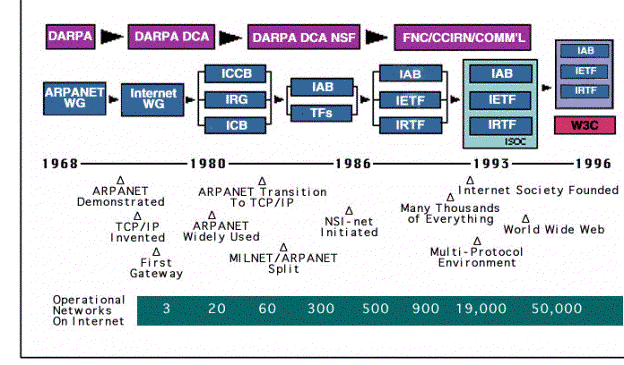
Network Computer in The Future
The recent development of the World Wide Web (WWW), telecommunications, and associated computer technologies have paved the way for a new concept in computing and communication. Envisioned by Larry Ellison (CEO Oracle), Network Computer (NC) has gain strong support and momentum in its short history of one and a half year. Even its rival, Microsoft/Intel group, had to come up with a similar plan, NetPC, as defense. Will Network Computer be the next revolution of computers? In this article, a broad range of Network Computer related topics, from design specifications to market impacts, are discussed.
Background and History of Network Computer
Evolution of Computer and Network Technology
The Internet , World Wide Web, and Intranet
The Internet has recently become one of the most exciting and explosive facets of popular culture. With the development of web-browsers like MOSAIC, its successor Netscape Navigator and Microsoft’s Internet Explorer, the World Wide Web (WWW) has undergone unprecedented growth. Since it’s conception in 1994, the WWW consumer market has already grown to 35 million users (currently) and is estimated to grow to over 200 million users by the year 2000. This rampant growth has opened many new opportunities for software and hardware companies.
Intranets are internal company networks that are very similar to the WWW, differing only in that firewalls (security devices) restrict unauthorized (non-employee) access. With the introduction of the WWW, companies have discovered how Intranets can offer up to 1000% return on investment (ROI) in less than three month.
Communication Technology
Telecommunications technology continues to improve. Digital phone lines (ISDN), fiber optics, modem technology, and other communications means allows users to transfer and receive data more efficiently.
Companies like IBM, Motorola, SkyTel, and others are working on ways to improve wireless communications technologies. One recent development in wireless technology (wireless) involves the utilization of radio frequency (RF) waves to transfer data. Radio stations may someday offer Internet access with extremely high bandwidth capacity and fast transfer times.
Object-oriented Computing
Object-oriented Programming (OOP) is new methodology of software engineering. A complex piece of software is breakdown into components according to their functionality. Therefore, writing a software is like building a car. One will first build nuts and bolts, gears and bearings. They are put together to make the engine, transmission and wheels. Then, these parts are put together to make a car. In object-orient design, an application is an integration of objects, each providing specific function.
Client/Server Technology
Client/Server (C/S) technology refers to a distributed network of software and hardware components. Applications, such as MS Word, reside on the client computer, while data is stored on the server computer. Each time that a user wishes to alter or retrieve data, he/she must send a request to the server, which in turn returns the requested information to the client. This technology enables users in many different locations to have access to the same data, while freeing up local (user) resources.
Java, Applet and ActiveX
Sun Microsystems’ development of a new software product named Java has also made a significant impact on the WWW. Java is commonly viewed as a new way to make web pages more dynamic – incorporating sound, animation, or even stock tickers into web page. However, it is becoming known as a new computing platform – the base upon which software developers can build applications.
Java is different from ordinary software in that Java applications, or applets, reside on centralized network servers. The network delivers the applet to your system upon user request. The applet runs inside a “container” such as a Web browser on the client system.This alleviates the user (client) from having to store applications on his/her computer, thus allowing cross-platform operability. Since the application resides on the server, and only the required components are temporarily transferred to the user when requested, client side software needs only be minimal.
The possible ramifications of this are unlimited. Applets could potentially replace most of client-resident software due to its flexibility and open-endedness. Users could download applications on an as-needed basis instead of having to purchase bulky, expensive software packages that most users never fully exploit anyway.
Microsoft has realized the importance of Java and has developed a similar product, ActiveX, Java has been accepted as the industry standard. Both Netscape and Microsoft have incorporated Java capabilities into their web-browsers, and many companies have begun to develop Internet applications based upon the Java platform.
According to a recent InfoWorld survey, one out of every three Web sites is Java-enabled with more than 20 million people using Java-enabled browsers.
Oracle, the world’s second leading software producer, has a vision for providing the world with an alternative to expensive, hard to maintain PC’s. On September 4th, 1995, Larry Ellison (CEO Oracle) introduced the concept of the Network Computer (NC). The NC is a “new generation of affordable, easy-to-use information devices…optimized for electronic communications, information access, entertainment, and a host of applications.”
The idea of NCs in its current incarnation emerged in late December 1995. The first client hardware systems were displayed in prototype form at the First JavaOne Conference in San Francisco by Mitsubishi and HDS Network Systems. Sun Microsystems concurrently announced the development of JavaOS, a new operating system for these new NC clients.
Other vendors had also been working on prototypes, and many felt there was a need for coherency in the infant market. Without a standard, the NC world could schism into a number of disparate proprietary mechanisms in which vendors scrambled to assemble their following before the gel set. With the future in mind, representatives from Apple Computer, IBM, Netscape, Oracle, and Sun Microsystems came together to create NCRef1. The preliminary specification was released on May 20, 1996..
Called “NC Reference Profile 1”, the set of guidelines is designed to make multimedia Internet computing as ubiquitous as telephone and television services. It promotes competition in a new class of communications and commerce devices for use in homes, schools, businesses and institutions and will ensure compatibility of models from different manufacturers.
NC Reference Profile 1 provides a common set of standard features and functions across a broad range of scalable NCs. It is architecturally neutral and intended to facilitate the growth of the network computing industry while protecting investments made by customers, content providers, system providers, service providers and application providers through industry-wide compatibility. The most important decision — to make NCRef1 platform-independent — was a given since the lead vendors needed to maintain their marketshare. Nonetheless, this selfish start resulted in many different platforms functioning with the same software. With the help of platform-independent Java, of course.
The NC Reference Profile 1 sets guidelines for standard functionality, but it does not impose limitations. Vendors interested in adding more functionality to their NC implementations may do so because the Reference Profile does not limit designs to a specific set of features.
NCs complying with the planned NC Reference Profiles may take many forms — from desktops to laptops to video phones, pagers and even conventional PCs. All these devices may be linked to the Internet or Intranet and run basic applications such as Web browsers, e-mail applications, word processors, spreadsheets and presentation packages. In addition, NCs may function as multimedia machines by supporting video e-mail, 16-bit CD-quality sound and digital videos.
Network Computer Inc.’s (NCI) hardware partners announced on Nov. 5, 1996 the pricing and availability of network computers, based upon NCI’s reference design. NCI, a wholly owned subsidiary of Oracle Corp., is working with the industry’s leading hardware, consumer electronics and software companies to deliver complete network computing solutions to corporations, ISPs and systems integrators. NCI’s partners demonstrated a range of existing and future NC(TM) devices and NC software applications at Oracle OpenWorld.
NCI’s partners have committed to produce the network computer for both the consumer and corporate market, in a number of different ‘form factors.’ RCA, America’s leading seller of color televisions, intends to manufacture a US$300 set-top box network computer for the consumer market. Funai, the premier manufacturer of VCRs worldwide will manufacture the JANESA, a network computer for both the corporate and consumer markets. Acorn Computer Group plc, Akai Digital, IDEA, Proton Industrial Electronic Co. Ltd, and Uniden also announced pricing and production details of their network computers all based on NCI’s reference design.NCI has been seeding the market with ‘proof of concept’ trials with over two dozen corporations and ISPs worldwide. Working with the hardware companies, NCI will supply the database, networking software, applications, consulting and support services to implement the network computer into the corporate and consumer market.
“Demand for the network computer has been phenomenal,” said Jerry Baker, President of NCI. “We are delighted to work with the finest hardware and consumer electronic manufacturers in the industry to deliver the promise of simple and affordable computing to our customers.”
Network Computer and its Features
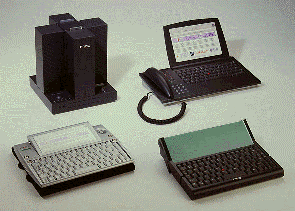
In simple terms, the NC is a stripped-down version of a PC or PDA (personal digital assistant) which does not have a large local disk to store software and data files. Instead, the vast majority of the software and data will reside on the server (host) computer, and will only be retrieved as needed, via Java (or similar) software.
Hardware
No-specific hardware specification is defined for network computer. Vendors can implement using any kind of microprocessor (memory system, video/graphics system, etc.) they prefer. A good many of NC client systems use uncommon CPUs, such as the ARM, StrongARM, ShBoom, and picoJava core chips. Any number of devices can be branded as a “Network Computer” if each implements the minimal qualities of the standard. Even a typical desktop computer can be considered a NC client station if it is used as a NC.
Operating Systems
In determining which operating system (OS) will become the NC industry standard, Java seems to be the leader. JavaOS, the customized Java-interpreting operating system from Sun seems to be the hottest contender. Other companies are also vying to sell the industry on their operating systems. Apple’s Pippin technology incorporates a cut-down version of the MAC OS, while Microsoft has allegedly been working on developing it’s previously aborted Windows for Pen Computing system to use as a NC OS.
Standard Software Component
To allow the flexibility and usability of the NC, network computer would operate on industry standards and protocols, such as TCP/IP, FTP, SNMP, HTML, HTTP, Java, SMTP, IMAP4, POP3, JPEG, GIF, WAV, and AU. This is an attempt to alleviate the problems caused by proprietary (closed) systems which has added to the complexity of PCs.
Computing Model
Network computer supports a variety of client/server models, ranging from the ultra-thin client to the fat client. The thin client is typified by a desktop system which stores applications and data on a network server, but performs all or most of the application processing within itself. Thin-client the preferred model for network computer.
The ultra-thin client does not store any applications or data locally, and all actual application processing is performed on a network server. The only local processing is that of graphical display. All the data that transpires between the client and the server consists of graphical updates to the screen. This is close to X-terminal. The fat client stores most of its data locally, as well as processes applications locally.
User Interface
Imposing a standard user interface, such as Navigator or Internet Explorer, for the front-end of all applications, The same user-interface (web-browser) would operate all programs, thus eliminating the learning curves of many applications.
Security & Access
At the heart of the network computer is an innovative SmartCard that provides users with easy and secure access to the network. Each user has a unique SmartCard — similar to a bank ATM card — that can be inserted into any NC. With a SmartCard anyone can access their personal data and electronic mail from anywhere in the world. One benefit of such as card-system is that users will be able to use other people’s machines without having to reconfigure the computer each time. Banks, offices, hotels, and other businesses will most likely have network computers available to their customers, and all they will have to do is insert their SmartCard into the machine to have network access.
Low cost
The promise of the NC lies in its low cost, ease-of-use, flexibility, and reduced maintenance costs. The first generation of NCs are expected to costs approximately $500, with lower prices for NCs which substitute a monitor with a TV.
Technology and Standards of Network Computer
There are already several standards and reference platforms for NCs. Vendors and industry groups are choosing sides to lobby their product as the standard. A NC standard is not necessarily the same as a NC reference platform. Usually a standard is less specific, less detailed, and therefore allows more flexibility in the actual implementation, whereas the reference platform is an exact hardware design that a product should follow.
Here are four NC standards and reference platforms as specified by a certain vendor or group of vendors, in no particular order:
- The Network Computer Reference Profile (NCRef) by Oracle.
- The NetPC standard from Microsoft.
- WeBRef by Motorola and HDS Network Systems.
- National Semiconductor’s Odin Reference Platform.
The NCRef and NetPC have by far the largest number of supporters. Not listed here are reference platforms and standards for products which cross into the home/entertainment market; this includes products like the WebTV and the Apple Pippin. In addition, a number of other vendors have made proprietary products which do not adhere to any of these standards (such as, Nokia MediaMaster, WebBook).
NCRef
The NCRef is a system standard and does not make limitations on implementation. Most of its requirements are software- and concept-oriented, and it is specifically hardware-architecture neutral. It describes support for common Internet protocols such as TCP, UDP, NFS, FTP, Telnet, SNMP, SMTP, IMAP4, POP3, BOOTP, and DHCP, as well as more Web-related standards such as HTML, HTTP, and Java. Finally, for security’s sake, there are optional standards for ISO 7816 SmartCards and the Europay/Mastercard/Visa specifications.
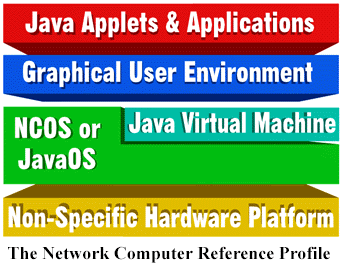
Hardware Architecture
While maintaining hardware-platform independence, there was still a need to provide specifics on the minimum and NC client station should provide. So these hardware resources are a guide, not a hard limit to the maximum capabilities of these systems.
The basic screen is 640 by 480 pixels and VGA-compliant; or at least its equivalent resolution and quality. A pointing device such as a mouse, trackpad, trackball, etc., would be required in the graphical environment. And you need a text-input device, such as a traditional keyboard, although no specific keyboard standard is indicated. So you could use a stylus to write directly onto the screen, PDA style, with optical character recognition to provide the translation into digitext. An audio output device is also indicated, so the NC revolution can be heard as well as seen, unlike with older X terminals. There is a clear message that there is no requirement for persistent local storage. This means local files on local filesystems on internal hard drives. With just these basic hardware tenets, any desktop PC in the world could be declared a NC client. So we’ll have to follow with the software requirements for the profile, which help further distinguish NC clients.
Operating System
The Operating System In the NCRef1, the NC client OS is not specified. This was a smart move. Every time vendors have attempted to unify the wide range of operating systems, they have either failed or had limited success. Vendors, by their own nature, have too much at stake in their operating systems, too much inertia to overcome, just to move over to a new standard. This type of inertia is one of the reasons why the Microsoft environment has been such a success and why no-one ever discovered the Grand Unifying Principle of Unix. Of course, splintering is not completely a bad thing. Differentiation of and within operating systems permits the exploration of new structures and architectures; it also adds the element of competition, so you can count on vendors to give you their best. But it can also result in a monopolistic control of the operating system and its direction once a vendor has reached the top.
There are a few rare occasions when the industry as a whole moves away from the established towards a new design. Java is the OS that currently occupies that spotlight. Java essentially came about because the World Wide Web and its bandwidth requirements needed a compact, simple language capable of creating relatively complex applications. And Java fit the bill. Latched onto the Web, Java has rocketed towards global acceptance as a rider on the Web. Because Java works on many major platforms, provides the complex programming environment for serious business applications, and yet still allows the development of platform neutral software, it was chosen unanimously to be the working environment for applications in the NCRef1. This means that new applications will be available across the numerous NC client stations that are currently in production, regardless of CPU or hardware design.
NC clients will still have their own native operating systems, but will also host a Java Virtual Machine for network applications. In fact, most vendors expect that only a few native applications will actually exist for NC clients and that those that do will be produced by the maker of the native OS. Vendors are relying on the growing pool of third-party Java applications developers and companies to generate the mass of tools, groupware, and custom applications that will be (and are) used in the workplace.
Protocols
Network Protocols NCRef1 is primarily designed around the Internet and its protocols. In fact TCP/IP is the base protocol of all NCs to date, although select vendors may support others.
At the network level is the Internet Protocol in its current incarnation, IPv4. IPv6, the next generation, may be added to the specification as it evolves, but is currently beyond the frame of NCRef1. TCP (Transmission Control Protocol) and UDP (User Datagram Protocol), the mainstay transport protocols of IP, will be used in the NCnet as well.
Application support protocols include the Simple Network Management Protocol (SNMP) for network management; and Bootp and the Dynamic Host Configuration Protocol (DHCP) for automatic client station network configuration.
Several electronic mail protocols will be supported. The Simple Mail Transport Protocol (SMTP) which provides the delivery mechanism for most of the e-mail delivery on the Internet will continue its place in the NCnet. Client station e-mail access protocols such as the Post Office Protocol (POP) version 3 and the Internet Message Access Protocol (IMAP) version 4 will allow users to access their server-based e-mail from any NCRef1-based client station. Additionally, although not explicitly indicated in NCRef1, e-mail document formats such as the Multipurpose Internet Mail Extensions (MIME) will be supported.
The current HyperText Transfer Protocol (HTTP) will be supported, as will the HyperText Markup Language (HTML). NCRef1 is not specific about which version of HTML it identifies, but we estimate that it covers at least version 2 (which includes Forms-based processing) and probably extensions from version 3.2 (such as Tables).
Other document formats needed to support the Web environment include the JPEG and GIF image formats, and the WAV and AU audio file formats.
On the application side, the most common Internet connectivity and file-access protocols will be included. This includes Telnet for remote text-based network connectivity to server systems and FTP and NFS for remote file access.
Security
The NCRef1 addresses the security aspect of NC clients in a vague manner. According to the Reference, NCs apparently are to rely upon their “No local storage” rule and the security of their server platforms for data and information security. And since the client stations alone are useless without user access to the server, there really isn’t anything to secure on the client side except the user. This places even more importance on user-level access and authentication which is partially addressed by NCRef1.
There is an optional security standard for ISO 7816 SmartCards and the Europay/Mastercard/Visa (EMV) Chip Card specifications. These provide an identification mechanism based on recently developed SmartCard technology. Although new in the US, it has been in test in European and Australian markets for a few years.
Each card has a chip and an Integrated Circuit (IC) that contains security and identification information per user. These standards offer a common access terminal and IC logic specification for vendors to implement. Additionally, they may also be used in debit card applications containing a dollar amount on the chip. Acting as an electronic wallet, it records each sale or transaction on the chip which can be read by a terminal for later record-keeping.
Many important issues still lie unanswered by the NCRef1.
- Inter-vendor product compatibility and user identification and access
Without a common identification scheme, you are left with the login process at the server level; the SmartCard system only addresses security, not interoperability across vendor products. This means that you may not be able to use an Acorn NC in a NCnet of JavaStation and Netra J servers.
- User profile and information storage.
There is no common protocol for identifying a user’s personal resources, account profile, etc. The inclusion of a protocol such as the Lightweight Directory Access Protocol (LDAP) would solve this issue. Novera is a one new company which has already tackled this problem and arrived with EPIC, their Enterprise Platform for Internet Computing infrastructure software package.
- Caches.
A lot of network activity can be reduced by caching data on local hard disk storage (just as long as it’s not used as local data storage). We know that most if not all Web browsers have a hard drive-based caching feature which speeds up access to common pages greatly. It is quite likely that this will be needed on the client station as well and not just for HTML pages.
- Web plug-ins
Although the basic formats are supported, PC-based Web browsers allow the ability to add new functions through a plug-in architecture. Application Levels are currently undefined and based completely on vendor preference. Some coherence (and dare we say, adherence to a single standard) is necessary in this area, either to the Java API family or to another.
- Network interface
There is an implicit understanding that NCRef1 relies on Ethernet technology. This should be broadened to include higher speed and other technologies.
- Browser standards
The Web browser and HTML standards definition should be expanded or at least clarified. Currently many NC client vendors are looking to implement the Netscape browser while NetPC vendors are taking to Microsoft’s Internet Explorer. A new front on the ongoing Browser Wars has opened.
- Confusion
Finally, the NCRef1 puts no limitations on what constitutes a NC. A PC with local storage and everything else that the standard includes could be construed as a NC. The statement that “persistent local storage [is] not required” does not exclude the possibility of having local filesystems. This could mean that any number of the hundred million PC desktops out in the market can call itself and NC if it meets the required guidelines and protocols. Although those in the know can tell the difference, neophytes and novices will only smack into another wall of confusion.
NetPc
The NetPC is more of a reference platform with descriptions for requirements in CPU (min. 100MHz Intel Pentium), memory, video resolution, internal peripheral buses, and so on. In fact, you probably have a NetPC on your desktop now — that Microsoft Windows desktop PC, no surprise. NetPC seems to rivals mostly a me-too standard from Microsoft to occlude the NC waters. Software-wise, the NetPC is based on Microsoft-only standards for operating systems and device drivers.
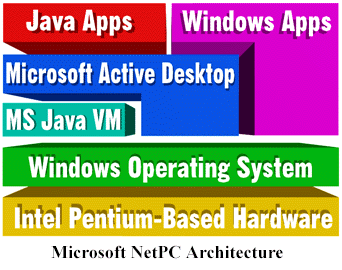
When the idea of Network Computing was first put forth in late 1995 and early 1996, Microsoft strongly opposed it. Their spokesmen, all the way up to Bill Gates, ridiculed the notion of a “dumb terminal” that would rob PC customers of their precious autonomy and turn away from the insatiable demand for ever more computing power. It is hardly surprising that Microsoft would fight a proposal that doesn’t include Microsoft’s operating system, especially since proponents of the NC from Larry Ellison to Scott McNealy made plain their hope that the NC revolution would at least blunt, and perhaps even turn back, the seemingly relentless march of Microsoft software on Intel hardware across the desktops and server rooms of the world.
What is surprising is how swiftly and radically Microsoft changed strategies. The network computing concept touched a nerve in corporate America that wasn’t going to be soothed by mere contempt. Microsoft, it appears, went back to the drawing boards and rethought the whole question of network computing and how it could affect Microsoft’s business model.
On October 28th, 1996, Microsoft and Intel, the leaders of the desktop computer industry, announced the joint NetPC initiative. It came with rallying cries and “count-me-ins” from such vendors as Compaq, Dell, Digital, Gateway, and HP, as well as other members of the PC industry.
As one would expect, the NetPC standard builds on existing, successful, hardware and system architecture while improving management and componentization of the overall unit. The specification itself, and statements from its supporters, make clear the new strategy. Microsoft and Intel identified a few of the most powerful issues at the core of the appeal of network computing. Corporate managers have expressed growing dissatisfaction with the cost and tedium involved in maintaining, upgrading, and managing Windows-based PCs, especially as installations grow into the thousands and tens of thousands. Microsoft and Intel have had slow-moving initiatives to address these complaints.
It appears that Microsoft and Intel are taking the tack of narrowing the debate to the key issue of maintenance and management of the PC installed base. If they can reduce it all to an argument about cost of ownership, and show an immediate solution (no matter how unimplemented), and brush aside all the other complex issues raised by the network computer concept — they have a chance to stop the NC revolution in its tracks.
The NetPC reference profile is a specification for a low-maintenance PC system that was designed with the network in mind. At the very basic level, it is a Windows-based environment that runs on an Intel/PC-based architecture. As we look closer at the design, you will notice that it is a new step for the PC market. You will also notice that it is very much not a minimally configured, low-powered system; the NetPC is no dumbed-down 386, and customer savings aren’t coming from initial cost.
Hardware specifications
The NetPC is a hardware specification first, and practically defines the desktop platform found in many corporations today. The hardware section of the standard also leaves room for the addition of interesting new technologies into the PC form factor. Although the rumor is that the essential savings in the NetPC will be a lowered initial price as well as savings in administration, Paul Maritz, Group VP at Microsoft, says “[not to] anticipate [that the] acquisition price will be significantly less than [the] traditional PC.”
Basic hardware components of the NetPC are
- CPU: Pentium 100MHz or equivalent;
- Memory: 16MB RAM minimum;
- Disk: Internal hard disk as cache;
- Video: 640×480 pixels at 8 bits/pixel (VGA);
- Audio device (type unspecified);
- Plug-and-play BIOS support;
- No expansion slots;
- Network interface (Ethernet, Token Ring, V.34 modem, ISDN, ATM, T-1);
- Keyboard, pointing device/mouse; and
- Locked/sealed case.
Optional hardware additions include
- IDE floppy drive,
- CD-ROM,
- PC (PCMCIA) card slots,
- Universal Serial Bus (USB), and
- 1394 high-speed peripheral bus.
Of these specifications, the components that command the most attention are the new device and peripheral buses, USB and 1394. These technologies are part of Microsoft’s earlier PC 97 initiative to create a new universal hardware platform for desktop PCs. PC 97 has been in the design stages for at least 18 months; it coincided with Microsoft’s plan for Windows 97 and a revision of the aging PC architecture.
In one direction, the PC 97 design led to the development of Microsoft’s Simply Interactive PC (SIPC). This is a target device for the consumer electronics/entertainment market. In concept, it is a predecessor to the NetPC device. The NetPC profile could emerge so rapidly because it borrowed from the PC 97/SIPC design. Still, the core designs of the SIPC and NetPC differ wildly when it comes to the operating system and device drivers.
The Universal Serial Bus (USB) provides a generic desktop bus for components ranging from a simple mouse to complex digital video camera systems. The concept for the USB is to simplify the number of connectors and cables in and out of the PC box. If this sounds familiar to you, think back to the older Macintosh desktop bus. The concept is the same, but the implementation is different. The USB allows you to hook a mouse to a keyboard, a keyboard to a monitor, speakers to the monitor, the monitor to the PC, and so on. Essentially, redundant cables and connectors are reduced, and not all of the cables have to be directly plugged into the PC system unit.
The IEEE 1394 bus (also known as FireWire) is a next-generation serial bus for external devices; it adds increased speed and more data paths. It was designed to suit a large variety of peripheral devices such as keyboards, mice, microphones, digital video cameras, and even common household electronics (of the future), such as stereos and VCRs. Systems based on the USB and 1394 architectures will be appearing on the market this year from vendors such as Sony PC, HP, Gateway, and Dell. Because of the new architecture, however, they will take time to reach a wide audience and even longer to be incorporated into a wide range of non-PC components.
Operating System
The NetPC is one step ahead of NCRef1 in that it also defines a specific operating system environment. Based on Windows 95 (and probably Windows 97), the operating system environment will be compatible with current Windows software and will not require any rewrites, recompiles, etc. It is unknown whether the Windows NT environment will also be available for the NetPC design. Technically, this shouldn’t be a problem, since the hardware design is not too far from current PC designs. However, the NetPC calls for some features that are still missing from NT 4.0, such as the plug-and-play support. The NetPC design will also not support the lightweight Microsoft Windows CE (Pegasus) environment for portable devices because of core differences in OS architecture.
Software
From the software viewpoint, the NetPC will contain
- A Microsoft Windows operating system,
- Windows 95- and NT-standard compatible device drivers,
- Machine-encoded unique identification numbers, and
- Built-in network-management agent software and integration with Web Based Enterprise Management.
- Automatic pre-boot device driver configuration
- Automatic system/software scanning for policy compliance
- Diagnostic tools for monitoring and predicting component failure
- System level trouble-ticketing software
- Remote wake utility
The unique identification of PCs is an interesting addition. This means that you may be able to track each NetPCs through its identification number to allow a greater degree of access control. Of course, this also makes it possible for vendors to license software packages physically to specific machines; duplicating it on your laptop might not be an option, and transferring it to a different system might not be so simple. It will be interesting to see how Microsoft and other software vendors exploit this opportunity.
Many of the automated elements that have been added are to support the simplification of the complex Windows environment to improve and ease management of each unit while attempting to maintain the status quo as a “semi-fat” client.
One assumes that other major Microsoft initiatives such as the Active Desktop or Active Themes (the unified Explorer environment) may also slide into the NetPC environment in due time; currently it has been delayed in the beta stage of Win97.
File systems
The filesystem for the NetPC has yet to be specified. One possibility for a future version of the spec is FAT-32, a filesystem Microsoft is developing as a replacement in future Windows system for the age-old DOS FAT (FAT-16) filesystem (FAT stands for File Allocation Table, the method used for managing file sectors). This new filesystem provides significant improvements in storage capacity, file names, performance, file information, etc. — basically, filesystem technologies developed over the last 20 years in other operating systems. It is not, however, the same as the NT’s NTFS file system, which is a step beyond even FAT-32 in some respects.
The local storage specified for the NetPC is to be used as a cache drive and probably the system disk. User data storage might be specifically moved to the network file server system.
WebRef
WebRef is a new reference platform created by Motorola with the help of HDS Network Systems. It is based on the new Motorola MPC800 PowerPC series. For an operating system, it currently runs HDS’ netOS NC/X-terminal operating system. Motorola and HDS have not outlined further information other than it will be a hardware reference platform based on their PowerPC microprocessors.
National Semiconductor was eager to join the fray with a promise of an incredible sub-$200 NC with Project Odin. It has created a reference platform specification of its own surrounding its embedded Intel 80486-based CPUs, the NS486SXF. In addition to the core 486, it also has a DRAM controller, a Direct Memory Access (DMA) controller, a PC card (PCMCIA) controller, an ISA bus interface, an infrared I/O port, a parallel port, and serial ports built directly into the same chip architecture. Consolidating all these components into one piece of silicon gives you an idea from where much of the cost savings can come.
The obvious question is: How does the NC (client) compare to the NetPC? Bear in mind that both standards are still in version 1. Oracle’s pioneering Network Computer Inc. swears that NCRef1 is still in development, although products which adhere to it are already available on the market. Products based on the NetPC 1.0 specification are scheduled to appear by mid-1997.
| Feature | NCRef1 | NetPC |
| Network Interface | Various (Serial, Ethernet, ATM) | Various (Serial, Ethernet, ATM) |
| Availability | Since Jun 1996 | mid-year 1997 |
| Acknowledged Vendors | Approx. 20 | Approx. 7 |
| CPU | Various | Intel x86 family, Pentium 100MHz |
| Memory | Wide range, typical 8MB | 16 MB RAM min. |
| Operating System | Non-specific | Windows |
| Disk | No (not required) | Yes |
| Local File System | Not Applicable | Possibly DOS FAT |
| Network File System | NFS, WebNFS, FTP | CIFS, Windows Networking |
| Network Protocols | Standard TCP/IP protocols | Microsoft-derived TCP/IP protocols (SMB), some standard TCP/IP protocols |
| Printer Support | Unspecified | Windows Networking |
| Mobile Support | Limited | Various |
| Development Tools | Native: Limited, NT: Wide range | Widely Available |
| Application Environment | Java, Virtual NT | Windows 95/97 |
| Applications | Native: Limited, NT: Wide range | Widely Available |
| Management Environment | SNMP | Microsoft/Intel software package based on DMI and WBEM |
Table 1. NCRef1 And NetPC
Based as it is on Windows, the dominant desktop OS, the NetPC architecture has a good jump on the NCRef1 design in some respects. For one thing, Windows is, by any measure, a more mature environment than Java. This means it has stood the test of time, but it should also be pointed out that Windows incorporates many elements which exist for the sake of backward compatibility; these plump up Windows and in the long run are dead weight, reducing flexibility.
The NCRef1 design works primarily in the Java environment, but many NC clients also have access to Windows applications through Virtual NT products. Note that the Virtual NT environment indicated is not officially a part of the more nebulous NCRef1. However, practically all vendors are including such a client/server-based system in their products. With the recent announcement from Insignia Solutions that their NTrigue client will soon be available as a Java applet/application, this may allow all NC clients access to legacy applications.
The software environment for the NetPC lies almost completely in the Windows application world. Although some development of Java products may result in NetPC applications, Microsoft is pushing for development in its ActiveX arena. This will result in more Windows-based applications with the new label of ActiveX components. Java application development is playing catch-up to the wide range of Windows packages, which does put Java-based network computing at an opening disadvantage.
The NCRef1 lacks features such as direct printer support. Already some vendors are looking to fill in this hole. X terminal vendors who have evolved into NC client vendors (with the first NC devices to market) already support network printing through the aging Unix print server (lpd) system. NetPC relies on the Windows network printer-sharing system to coordinate printing across the LAN.
But what about one of the most important features which may help to reduce the total cost of ownership — the management of the software environment? So far, this is the most ambiguous element in the two specifications. Currently it appears that NCRef1 vendors will base most of their products on common SNMP-based (Simple Network Management Protocol) tools such as Sun Solstice Manager and IBM NetView. The NetPC management environment will revolve around the Desktop Management Interface specification, originally developed by the Desktop Management Task Force (DMTF). It is curious that Microsoft once almost completely ignored the DMTF’s work, even after participating ever so actively in the endeavor. Microsoft had made statements that it may not include the DMTF’s work in its future operating systems. Now it looks like they are back. Intel, also a member of DMTF, will certainly be happy to see this development.
Can NetPC compete?
Microsoft and Intel are powerful players; their rivals, also powerful, include Oracle, Sun, and IBM. It is far too early to see the direction the battle for the soul of network computing will take even this year, let alone in the long term. How adroitly each side plays its hand will determine a lot, as well as how the customers — especially, in the short term, the corporate customers — decide what’s important.
Beyond the design and component issues, the philosophy of the vendors involved helps determine their motivation, their strategies, and their constraints. Microsoft is the leading vendor of desktop operating systems. From their origins as a low-end desktop environment vendor they have successfully transitioned into the corporate world of enterprise systems by adding products like NT to serve the Windows client systems. The network computing initiative is the first serious threat to Microsoft’s march across the entire computing environment, and Microsoft is taking it very seriously.
Consider the motives of the corporate buyer, the intended beneficiary of these specs. Mainframes with terminals turned out not the be the universal computing system, so local computing devices swept in — this includes the PC, of course, but it also includes the Macintosh and even the Unix workstation. Most corporations include an awful mix of systems, and all wish they could reduce everything to one universal computing device.
With Wintel PCs so widespread, Microsoft has had a powerful argument for grinding down all client/desktop rivals, from Macintoshes and workstations to dumb terminals. Nothing could stand in its way. Though the systems are a pain to manage in their own right, at least an all-PC corporation has only one environment for the thousands of custom applications that the IS department grinds out.
The NC proposal has challenged that apparently inevitable vision at its deepest levels. Understand that the network computing revolution isn’t just based on lower costs up front, and easier maintenance because the box is locked shut. Because of Java, corporate buyers for the first time find the pressure of running custom applications on a variety of hardware radically reduced. Write-once run-anywhere has its strongest appeal in corporate IS circles. If it really works, IS no longer has to buy expensive and quirky PCs for every single desktop, regardless of use. Instead, IS can put the most suitable hardware and software on each desk — PC bigots can keep their PCs, Macintosh bigots can keep their Macs, and the silent majority who don’t know and don’t care what’s on their desk can get an NC. Custom software will run the same on all of them.
Picture a shop with 100 desktops. Because five of those desktops are occupied by PC power users, the only sensible thing to buy was PCs for everybody. Last year, that was the only sensible thing to buy. This year, you could put NCs on 95 desks and leave PCs on the desks of the five PC power users and probably save a bundle while you are it.
Network computing is the first concept to promise to reduce the reliance of the hardware and operating system sitting on client desks, to give corporate IS more choices, and to stop in its tracks the powerful drive towards simplicity-through-monolithic-systems.
Any Microsoft/Intel employee who doesn’t find that prospect disturbing isn’t paying attention. The NetPC proposal first makes sure Wintel PCs are part of the mix in any network computing planning session. Longer term, NetPC aims to put on the front burner initiatives designed to reduce cost of managing a large-scale PC environment.
Keys to success for both sides: Define the debate
The success of Microsoft and Intel in this initiative will hinge on two elements: First, how well they succeed in making the “cost of managing desktops” the key, or better yet only, issue in the minds of corporate customers, while minimizing all other issues (especially write-once run-anywhere); second, how well they deliver on the PC management software.
On the other hand, the success of the NC rivals to Microsoft and Intel will depend on how well and how quickly they execute on producing a wide range of useful non-Microsoft/Intel NC systems, and (just as important) how good a job they do of keeping the public convinced of the importance of the rich mix of issues, especially platform independence for corporate custom software. They will have to emphasize loudly that cost-of-ownership is more than just managing software upgrades; that other factors are equally important contributors: write-once run-anywhere application development, the ability to suit the system to the user’s needs, the benefits of location-independent access, and the better management of data storage and file systems that comes from fat-reduced clients
Products and Manufacturers of Network Computer
You can also classify NCs according to their purpose or manufacture. Here are some designations and categories for NCs and related devices:
The Desktop Client Station.
These are devices which exist only in a networked computing environment with a core focus on Java applications, such as those following the NCRef standard (Oracle NC, JavaStation).
Minimal or Sealed-Unit PCs.
These are devices to be created according to the NetPC and Odin standards, as well as others made independently, such as the AcerBasic.
Hand-Held Devices.
These look like PDAs, but actually rely on a wireless or wired network environment, such as the WebBook and the Acorn PDA. (But not the Newton, until Apple completes its Cyberdog Java implementation into the Newton OS.)
Internet Access Devices (IADs) and Set-Top Boxes (STBs).
These boxes connect to television systems and provide access to the Internet through built-in Web browsers. They may or may not have Java support.
Java-based X Terminals.
X terminals whose local operating systems have been improved to include a Java Virtual machine, such as those from HDS, NCD, Boundless Technologies, and IBM.
Internet appliances
An array of other Internet appliances, such as network-televisions are also in development. These next-generation NC will be developed by Scopus, IntelliMatch, Com.Sortium, The Consumer’s Choice Network, and NetChannel. Another side of the network computer- television market is being developed by companies such as WebTV. WebTV, in conjunction with consumer electronics powerhouses such as Sony and Philips, will manufacture web-ready set-top boxes for Internet/TV use. WebTV has also forged alliances with other companies including: Concentric Network Corp., Excite Inc., Headspace Inc., Integrated Device Technology Inc., Progressive Networks Inc., and Surfwatch Software Inc.
Intelligent Telephones.
These devices provide executive telephones combined with network access, such as the Acorn ExecuPhone.
The following is a table organizing some of the common products according to the categories.
| NCs by Category | |
| Desktop Client | Sun JavaStation, Acorn/Oracle NC, IDEA Internet Client, Wyse Winterm |
| Minimal PC | AcerBasic, Unisys Aquanta, Monorail PC |
| PDAs | WebBook, Mitsubishi MonAmi |
| Computer Phones | Acorn ExecuPhone |
| IADs and STBs | Apple Pippin, WebTV, Zenith NetVision, Nokia MediaMaster |
| Java-based X Terminals | Boundless NC, NCD Explora, IBM Netstation, HDS @workstation |
Tabel 2. NCs by Category
Many of the systems in the above table are not only breaking new ground, their designers seem intent on making sure they look like they are breaking new ground. Prompted perhaps by the designer look of Silicon Graphics workstations, vendors are putting pizzazz into the once-beige pizza boxes.
Sun’s JavaStation is a blue and purple, ellipsoidal cylinder seemingly slashed diagonally from top to bottom; the Acorn/Oracle desktop model is a black unit which looks like a plus sign extended vertically in 3D; IBM’s NetStation is almost a thin little book standing on its end; the Akai Internet Connection looks like a home VCR; and, most amusingly, the WebBook looks like that favorite childhood toy, the Etch-a-Sketch.
It is nice to see vendors moving away from the basic slab or box look to more designer artwork, even if it isn’t always for a practical reason. Just think: Your leading-edge corporate desktop client might soon look more trendy than your kid’s Nintendo-64!
Having a client station is great, but without software, you can’t go anywhere. Software for NCs is appearing in various forms. Several companies, such as Sun and Oracle, have announced application suites along with their NCs. Most software for this new industry will be written in Java; however, with Virtual NT products, you can still maintain a good foothold in the older Windows application arena.
Current software offerings are limited, but leading vendors are working hard and fast to move their packages into a pure Java format so they can support this new environment and the Internet. The following table shows a listing of some of the software products targeted for the NC market (source: The Java Solutions Guide, Oct. 1996); these packages run in the NCnet either on the client or on the server side.
| Categories of Software for NCs | |
| Software Type | Products |
| Productivity/Groupware | Oracle’s InterOffice Suite, Sun’s HotJava Views, Corel Office for Java, Sanga Pages |
| Authoring Tools | Applix Anyware, FutureTense Texture, DimensionX Liquid Motion |
| Retail | BAAN IV |
| Database | Active Software ActiveWeb, D&B Software SmartStream, Information Builders’ WebFOCUS, SAS Institute SAS/SHARE*Net |
| Object Development | IONA Technologies OrbixWeb, Sun JOE NEO |
| Application Development | Sun Java Workshop |
| Publishing | CADIS Krakatoa, Corel Barista, InterLeaf Java Worldview |
| Financial | Bulletproof MarketPage & WallStreetWeb, HANI HOME Account, Stock Smart |
| Manufacturing | BHR Info.net |
| Network Connectivity | OpenConnect OC://WebConnect |
| System & Network Administration | Sun Solstice Management APIs, Micromuse Netcool/OMNIbus, Wyatt River Software LicenseTrack |
Tabel 3. Categories of Software for NCs
There is no uniform desktop GUI or window manager for all NCs. Sun’s HotJava Views provides a rudimentary window manager as a pure Java application for the JavaStation. The Java-based X terminals already have their own native window managers and GUIs. The NetPCs use a Windows 95-like environment. TriTeal Corp., one of the leaders in the Common Desktop Environment (CDE) business, is looking to create a unified environment for NCs, just as they did for the world of Unix.
Some of these GUIs or windowing systems are dependent upon a specific server type. The HotJava Views environment currently only works with the Sun Netra j server, although Sun is working on porting the server component to other Solaris servers and operating systems as well. The NetPC is dependent upon an NT 4.0 server from which to boot and run applications. Some of the Java-based X terminals have local application software stored on ROM, local PC card hard drive, or by remote boot off a Unix server on the network.
A software product for the NCnet is more than just a Java applet or an application. It needs to be aware of how to communicate with a remote server and the environment of the server itself. You have to be able to start the application from the NC and work completely within the limitations of the NC. This means working with networked filesystems, small memory environments, and, at times, limited I/O devices.
A number of applications are now being based upon the JDBC (Java DataBase Connectivity) standard and access information directly from common enterprise or workgroup database systems such as Oracle, Informix, or Microsoft SQL Server. This in a way eliminates the need for a filesystem since most such databases are essentially very advanced file and information systems. Others work with files through the Network File System (NFS) standard, mounting their areas from remote servers. Interestingly, NFS servers have excelled over the past few years in speed and reliability. The NCnet might just lead to new growths of dedicated NFS server vendors, such as Network Appliance and Auspex. This would additionally move the responsibility of disk storage into the more capable hands of these highly reliable systems and away from local hard drives which suffer from numerous ailments.
One ongoing problem, that of Bloatware, is being addressed by the NCnet and Java. Software packages have grown larger and larger over time, until they have reached truly huge proportions — hundreds of megabytes for some PC office suites, for example. The applications have a lot of capabilities built in, and while most of these features are rarely used, the exact mix used varies from customer to customer. Operating systems, meanwhile, take 50 to 100MB of disk real estate, and prefer 16 to 32MB of RAM to run well.
We can thank the Java gurus for giving us the chance to return to simpler times. NC operating systems can come in sizes as small as one megabyte and require a few hundred kilobytes of memory to run. Modular applications can mix and match functionality to provide all the appropriate capability of monolithic software. Software for NCs can still bloat, but one peculiar blessing of limited communications bandwidth may be the ongoing incentive to control code size.
A List of Network Computer Related Product and Vendors
| Company | Product(s) or Service(s) |
| 3Com | Various high-speed network access applications and products |
| Acer | AcerBasic NC, NC II |
| Acorn Computer Group | Acorn NC (formerly NetSurfer), Office NC, Set-Top-Box NC, ExecPhone NC, NC TV |
| Acadia Software | Infuse 1.0 visual JavaScript editor |
| Active Software | ActiveWeb is a software framework for enabling network-centric distributed computing that can integrate legacy and database systems with each other and extend them with Java to the Web |
| Advanced Web Technologies | Offers Java training, Java curriculum development, and Java software engineering and development support |
| Advent Network Management | Provides Java- and Web-based network management software, such as Advent NetMonitor 1.0 (beta), Visual SNMP Applet Builder, Java SNMP Package 1.0.2, MIB Browser Applet 1.0.2, Source Code and Source Licencing for SNMP Package, and MIB Browser Applet 1.0.2 |
| Affinity Systems | Supplier of PC-to-IBM Host connectivity solutions |
| Agave Software Design | JDBC NetServer links Java applets to standard databases |
| Akai Digital | Akai Internet Connection NC ($349) offers Internet connection through a television set. |
| Apple | Apple, IBM, Netscape, Oracle and Sun Set First Guidelines for a New Generation of Low-Cost, Easy-To-Use Network Computers |
| Applix | Anywhere Office Java-based desktop office suite |
| AT&T | SunRiver subsidiary gets AT&T order for network computers |
| Bay Networks | High-end network routers, frame relay access devices, 100BaseT fast Ethernet interfaces, and cable modem products |
| Boundless Technologies | XL and XLC X-ready network computers |
| Check Point | FireWall-1 3.0 lets administrators define rules or force authentication procedures for any connections that applets try to make to outside servers once they have landed in a network |
| Cisco Systems | Applications that centralize management, automate routine tasks, and can be integrated into customers’ existing network management environments, including the Cisco Internetwork Operating System |
| Citrix Systems | WinFrame software enables deployment of 32-bit Windows apps to non-Windows machines |
| Comshare | Commander DecisionWeb gives end users “thin client” DSS applications with dynamic ad hoc reporting on a par with full-function client/server applications |
| Corel Corp | Pocket Network Computer is a PDA type NC which will let users send and receive E-mail and faxes and browse the World Wide Web. starting under $500. It also includes a built-in modem for Web access via either wireless or dial-up connections |
| CreateSoft | powerBlend is a collection of reusable Java components |
| CyberSQL | ActiveWeb 7.0 is a Java class library for database-activating Web applications |
| Dickens Data Systems | NCD Explora X-ready network computer |
| Dimension X | Liquid Reality is a set of Java class libraries to incorporate VRML into viewers, tools, and applications |
| DTAI Inc. | JustDBC is a suite of drivers, proxies, and servers that conform to the Java Database Connectivity standard (JDBC) and Microsoft’s Open Database Connectivity (ODBC) standard |
| Finjan Software | SurfinGate is a gateway server that examines the code of applets and administors digital IDs to identify them |
| Funai Electric Co. Ltd | Janesa NC ($500) |
| GraphOn | 19S and 14S X-ready network computers |
| HDS | The @workStation line of X-ready network computers: @workBasic, @workPrima, @workSupra, and @workDuo And the NetOS NC operating system |
| Hewlett-Packard | Envizex and Entria line of X-ready NCs |
| IBM | IBM Network Station |
| IDEA Inc. | Internet Client Station (ICS) ($500) addresses the requirements for terminal enhancement and replacement, multi-tier client/server transaction processing, and office automation. |
| Infospace | WebSeQueL is ready-to-use, thin-client Java software for browser-based access to IBM’s DB2 databases The Fresco product family, a complete system for rapidly creating and deploying live Java database applications over networks; includes Fresco Designer Java RAD tool, the Fresco Information Server intranet application server, and Fresco Adapters, a set of adapters that connect to databases |
| Insignia Solutions | NTrigue software allows X devices to display Windows applications |
| JavaSoft | Inventor of Java The Java NC Server |
| JCC Corporation | iBox allows connection to the Internet through your TV |
| Lucent | The Inferno networked operating system |
| Marimba | Castanet distributes and updates self-installing software across a network |
| Merz.Com | NetScope, a Java-based Web mapper, offers a global view of the Web instead of the traditional hierarchical view. The Viewer applet runs on any Java-enabled browser and no client-side software is needed. |
| Microsoft | ActiveX scripting language |
| Microtec | XRAY for Java debugger, JavaOS on VRTX, and Spectra for Java development tools |
| Mitsubishi Electric | The high-speed, motion-video distribution Media Gallery Intranet media servers: MG80, MG200, and MG400; and the StarWorks NT motion video distribution software |
| Mortice Kern Systems | Web Integrity 2.1 is an easy-to-use Web Object Management system designed for business users of the Intranet |
| National Semiconductor | Odin Reference Platform |
| NCD | NCD Explora, Explora Pro, HMX, HMX Pro, and HMX Pro24 X-ready network computers; Mon Ami and Amity software |
| NCware Technology | Create Java business apps, such as HotUI, a collection of Java GUI bits; HotForm 1.0 for forms creation; HotChart 1.0 for graphing and display database data; and JDAP 1.0.0 (beta), to provide Java client interface access to universal directory servers |
| NCI | See Oracle |
| Netscape | Creators of JavaScript. The Communicator — an email, groupware, and browser suite, including Messenger (email client), Collabra (Intranet collaboration tool), Conference (real-time Intranet conferencing), Composer (document generation), Calendar (Intranetwork scheduling tool), and Java-based IBM host on demand solution (to bridge the gap between host systems data and intranets). |
| Novera | Enterprise Platform for Internet Computing, an environment for developing applications that run on NCs |
| OpenVision | AXXiON network management software and Oracle database monitoring and back-up systems |
| Oracle | All of Oracle’s products will support their Network Computing Architecture. InterOffice 4.0, Oracle’s Web-based collaboration software, incorporates three productivity applets that will run on network computers; a word processor, spreadsheet and presentation graphics, code-named HatTrick |
| PhaseNet Systems | The PXCH and PXCS families of x-ready network computers |
| Powersoft | Starbuck is a Java Rapid Application Development tool |
| Sanar Systems | APPI-500 X-ready network computer |
| SCO | Tarantella allows Java clients with access to graphical X applications, character-based Unix applications, and Unix SQL data across the Internet |
| Sun Microsystems | Netra J server, JavaStations, Java, and Solaris |
| Tektronix | XP200, XP200H, XP400, and XP400D series of X-ready network computers WinDD software enables deployment of 32-bit Windows apps to non-Windows machines |
| TransactNet | WIT, the Web Interface Toolkit, is just one of the Web business-application development and deployment tools |
| TriTeal | SoftNC is Java code that creates a graphical end-user display that is downloaded to the NC |
| Trusted Information Systems | Gauntlet Firewall is a gateway server that uses Microsoft’s AuthentiCode digital certificate security to only allow ActiveX applets with the proper credentials into your system |
| TVObjects | Applet Designer Pro and Enterprise are Visual Basic 4.0 add-ins that allows developers to create Java applets with Visual Basic — the products also support JDBC |
| Unisys | Unisys Announces Support for Oracle’s Network Computing Architecture ClearPath Enterprise servers, ClearPath SMP servers, and Aquanta PCs |
| The WebBook Company | The WebBook NC |
| Wyse Technologies | Winterm 4300SC, 4600, 4700SE NCs |
Issues and Controversy related to Network Computer
The difference between NC, PC and Dumb Terminal
In contrast to PCs, disk drives are optional with NCs. It depends on the design, the use, and the need. One thing is clear, though: Welding shut the case doesn’t turn a PC into an NC. There’s more to it than that (otherwise there’d be no point to it). Most NC clients will contain the operating system on Flash RAM or ROM, and all the user file storage is on the server system, so essentially there is no need for a hard drive. Some vendors may decide that they need a hard drive in the box, not for local file storage, but as a cache. Since tons of information may pass back and forth across the network, a small hard drive acting only as a cache could speed operations significantly.
For cost-of-ownership reasons, software on NC commonly aren’t upgradable because there is nothing that needs to be upgraded. If you think about the concept of the NC, you can see that upgrades, whether software or hardware, ought to be done on the server, not the client.
A “dumb” terminal is a system which displays the output of a shell or interface from a host system. They don’t do any computing themselves, beyond what’s needed to display text or, in the case of X terminals, graphics. Everything is done on the host computer.
That doesn’t describe the NC client. An NC is designed to take advantage of the fact that it’s on a network. It does its processing locally, just as a PC or Unix client system does, but all other aspects of the system are up for grabs. In current designs, it’s common for all computing to be done by the client, but all or most application and data storage to be on one or more servers. There are numerous advantages to doing so. Since NCs make fewer demands on the server, a modest server can support more NCs than X terminals or even dumb terminals.
In the long run, NCs will run the gamut in how they use the network, including situations where certain kinds of processing will take place on compute servers dedicated to special tasks. You see this now in Unix networks, where high-powered tasks, such as graphics rendering, can be farmed out by the workstation to specialized graphics servers elsewhere on the network.
Client Performance
- CPU Speed
NCs are not slow or low-powered when you consider that many PCs have less powerful microprocessors than many NC clients. For example, the Digital/ARM StrongARM 110 CPU is faster than the 200MHz Pentium Pro in some applications, yet it is about $35 to $40 each in production quantities compared with the several hundred dollar Pentium Pro. Digital’s semiconductor group has released Caffeine-mark ratings (Java speed measurement) of Java performance for a prototype NC client using the StrongARM. In this test, a StrongARM 110 with 8MB of RAM came out with twice the performance marks as a 200MHz Pentium Pro with 64MB of RAM.
Other NC clients will contain CPUs such as the RISC-based Intel i960, quite respectable in performance. Sun Microsystems’ approach is to create the picoJava, microJava, and ultraJava chips — CPUs that contain the Java byte-code instruction set at the hardware level and perform without any optimization as fast as the traditional PC running a Java applet or application using the best just-in-time compilers.
- Memory Size
Most NC clients today are designed with limited amounts of memory — 8MB to 16MB — and unlike most other systems, they do not include a virtual memory or memory paging system, which require disk drives. This means that the physical memory is all that you get. Windows users have just started to get a feel for functional virtual memory and almost everyone knows the problems the DOS memory limitations have caused. And now NC vendors will be limiting their client memory size?
Well, yes and no; and, it doesn’t matter as much as you might think. Yes, they are shipping 8-megabyte NCs, but that’s because the early systems are being sold into situations where users will be running one or two custom applications and not necessarily at the same time. A great many current NC applications lie in the floor of manufacturing plants, for example, where they will run at most two applications and only very select ones at that. No, they are not limited in RAM because in many cases, especially the adapted X terminals, they can be expanded to add as much RAM as you like, should you need it. For example, the NCD HMX line can contain up to a 136MB of RAM. You’ll probably use that in rare situations, such as high-end 3D graphics viewing.
Also the comparison isn’t always straightforward. Most NCs will be running Java-based applets or applications, which tend to be much smaller in code size and require much less processing power for the same level of performance. That’s why you see so many NC clients with relatively small amounts of memory. People are boggled at NC clients with a few megabytes of RAM compared with 12- to 24MB for Windows or Unix systems. They are so accustomed to memory-abusing applications that it just hasn’t sunk in that Java applications are different.
Software Performance
Java is slow, so NCs are too slow for any productive use. This statement is true in some cases, and to a limited extent; but it isn’t exactly true in other cases. So far, most Java applications have been slower than comparable platform-dependent applications. The bytecode interpretation mechanism within Java uses several more steps than native opcode operations of the CPU. At some degree, you have to surrender a slight degree of performance to gain the platform neutrality aspect.
But remember, Java is still very new, and in the early stages of development. With improvements to its structure appearing this year — especially to performance-related aspects such as graphics and events processing — as well as better Just-In-Time compilers, the application software will come up to speed. Then, too, Java-based componentized applications can be expected to be much smaller than gigantic monolithic applications currently dominating the PC marketplace; smaller applications should run better than much larger ones, even if interpreted versus compiled.
From another angle, the CPUs that will go into the next generation of NC clients will sport a better setting for Java as discussed previously.
One last fact when it comes to the performance of some applications. Vendors have been so eager to release their Java-based applications that they have pre-empted themselves into releasing alpha versions. Alpha software is buggy, contains a lot of debugging code, and has had little or no optimization; they are consequently slow, clunky pieces of software that are good to look at, terrible to test, and even worse, to use.
Network Performance
The load of network generated by NCs is no more so than other networks built for NetWare or Unix systems. Ethernet and other current network technologies are capable of handling the load of an NCnet. People worry that since applications have to be downloaded to the NC to run, this will flood the network with traffic. Not true. Apps are downloaded once, then cached locally; they aren’t run off the server, or downloaded over and over. In addition, remember that Java-based software is expected to be much smaller than its PC cousins. Smaller NC applications, coupled with a compressed-format application-distribution system, can actually result in applications that start faster than locally-stored PC applications.
One reason NC apps written in Java can be smaller is that the applications can be modularized; there isn’t the need to create monolithic kitchen-sink apps that take up so much of the PC’s resources. PC developers have dreamed of component applications in Windows that will allow them to do the same, but it hasn’t happened yet.
Some people get confused by the fact that access to the Internet is slow. Fortunately, NCnets are currently designed for the corporate intranet, not the external, bogged-down Internet. Most of the time you will be using the server on your LAN to download applications and transfer data across your much speedier internal network.
Server Performance
The glass rooms of yesteryear raise fears that storing your information on a server translates to less access and heavy time-sharing burdens. People moved to PCs because they did not want to be slowed down by the work that others were doing on their time-shared, multi-user systems.
NCs take the tasks to the desktop; just as with PCs, NC programs run locally and are not affected by the work of others. And although users will be accessing data from a server, a great amount of work is already done that way:
- You download email from a server.
- Much of the information you access involves a database server.
- You reach across the Internet with the help of a Web server.
- You correspond with others in a workgroup bulletin board through a Lotus Notes or other groupware server.
- To retrieve, update, and return files requires your network file server.
If you tell a corporate desktop user you are taking away his or her computer to replace it with an NC, the immediate reaction is “NO! It’s MINE! PLEASE don’t take it away!”. This is a visceral defense; the user thinks freedom is being replaced with chains of corporate control.
But the NC Shift doesn’t eliminate personal freedom and property — potentially it does just the opposite. With the NC Shift, your personal, virtual space still exists — only now you can access it from other physical locations. Depending on the implementation and the needs of the organization, the NC user can gain access to wider-ranging resources available on the network, maintain up-to-date software, and take advantage of centralized benefits such as regular backups. The user is as protected by his password on NCs as he is on PCs.
Users of Unix workstations have been familiar with this level of freedom for many years. They keep all files, email, and other documents on the Unix system and access them over the network, using tools like telnet or through X Windows. They don’t feel controlled by the IS department.
Another fear is that users will be cut off by complicated network computer such as Java. Again such fear is groundless. Just like you don’t need to know how to write Windows apps to use Microsoft Word or Lotus Organizer, you don’t really need to know anything about programming in Java to use network clients. Learning how to use the environment shouldn’t be much of an issue, however, beyond learning how to log in and click on a URL to start an application. Several environments are vying for the opportunity to offer simplicity and consistency to the NCnet user. JavaSoft, for example, has built its application environment, HotViews, for extreme simplicity and ease of use. The user interface is non-complex, organized, and straightforward — a step in the opposite direction GUI’s have taken in recent years. On the other hand, TriTeal’s SoftNC offers users a choice of familiar environments — Windows, Motif, Open Look — running on everything from NCs to PCs to Unix systems, making consistency across platforms into a big virtue.
Well, not many. The number of software packages directly designed and developed for the NCnet is still well below a hundred. But there are plenty of vendors who are trying to fill that gap right now. Corel, IBM, and Lotus have already proved that their applications can transcend the clutches of platform-dependent computing into a Java NC world. Corel is actively promoting the Office for Java application suite which contains WordPerfect and Quattro Pro and runs on any Java-capable platform; the Marimba Castinet version even runs through your Java-enabled browser (through trans.corel.com). Lotus, not to be left behind, has been working on its new Java-based client to access Notes servers. It is also working on a new integrated environment/personal information manager known as Lookout to its NC environment. Lookout is similar in concept to the new Microsoft Office 97 Outlook.
We stand at the intermediary position between the world of traditional application development and widespread Java application development. In this transitory period, the future always looks brighter than the present. However, with the interest in Java development growing at a phenomenal rate, we may see a mass infusion of applications into the market over the next two years.
However, almost all the NC client vendors have incorporated a Web browser into their system and some also, include Virtual NT clients. So you can access information and applications of other systems that are not yet native to the NCnet. Already, this gives you access to thousands of popular software packages while still achieving the goal of reducing management costs by minimizing the client environment and focusing the data within a common area.
Bear in mind also that access to packaged software is not the driving issue for many customers. They create custom software for access to corporate databases, and client systems are dedicated to these uses. The ability to run 10,000 DOS and Windows programs off the shelf is not the point; the ability to run the same (Java-based) custom application on a wide variety of hardware and OS.
Another concern is that the server platform for the NC clients is still hard to find. Sun Microsystems currently has the Netra J server which provides the application environment for their JavaStations. X terminal vendors are relying on their X11-based access to Unix and other server systems built into their NCs; Although, Oracle has announced plans for their server suite, but will wait until their NC licensees have released client systems at their planned date.
With desktop PCs, employees are often limited in their ability to share information with others, and even with themselves when they are not at their desks. To provide access to files and programs, we spend time and money creating special remote-access software so users can view or work with this information from machines other than their own stations.
With an NC, data and programs (and even workspace settings and preferences) are placed on the server. When users need to, they can access their data from any NC location and they have their complete environment set up for them no matter where they go. You no longer need to have a desktop shackled to your foot.
How about when you really on the go? Currently people using laptop computers have all the application programs and files with them on the local disk. Network computer user will have to rely on some sort of wireless network. Such technology is in rapid development. For example, IBM has created a Mobile and Wireless Systems Unit dedicated to creating and developing new ways of computing remotely. Some of the products that they currently offer include: RF Data Collection Terminals, RF Multi-Function Terminals, AS/400 Wireless LAN Adapters, Wireless LAN Entry Adapters, Wireless LAN Adapters, and Wireless Modems. By utilizing RF technology instead of the traditional, more expensive cellular method, IBM hopes that it’s products will offer an inexpensive, simple solution to the rising demand for greater bandwidth and mobile communications. These products, combined with the Network Computer could change the face of computing and communications altogether.
As with the introduction of anything new system, concerns about security have arisen. Due to the fact that data will be stored remotely (on the server), speculation has arisen that data integrity & security may be compromised.
The security of NC clients depends on software application security and user level authentication and authorization.
Application security is addressed with the recently released Java Security API to provide Signed Applets. This lets you uniquely identify applications to confirm their validity.
User-level security depends on how things are managed. NCs that are closed boxes with no floppy drives offer administrators the obvious advantage of being able to control all software through the servers. Depending upon the system, policy, and capability, users may also be able to install their own software in their private areas.
User-level authentication, still new to the PC market, will be a required part of the NCnet system through the use of user passwords and/or hardware-based security such as SmartCard technology. SmartCards have a small microprocessor that contains complex identity information.
While the security concerns of network computer are somewhat justified, new methods of encryption and IP tunneling (data channeling) have solved many of the security concerns that face Internet applications. However, the US Government has restricted the use of such tactical encryption techniques- such as PGP (Pretty Good Protection), due to the fact that even the FBI/CIA and other government agencies cannot access files that have been encrypted with this technology.
Another kind of security problem arise when Java and/or ActiveX is used in network computer. The Java applet or ActiveX object actually runs on the client system. By definition, then, they have the access and control to user’s applications and files. They offer virus writers and hackers a perfect network entree. Java applets, in general, are currently not allowed to access a hard drive or files, or open up new net connections, while ActiveX objects do. Since these technology are relatively new, this kind of security bugs are being discovered and fixed.
Even when starting off in a whole new direction, it would be silly of vendors to utterly ignore the application base of today. Several of the products listed here already include access to Windows applications using Virtual NT technologies such as WinFrame and NTrigue. This system allows users to run Windows applications on a remote server system and have them display on their local screen, akin to how X11 has worked in Unix systems for many years. Even Sun has licensed the core technology behind these systems to create a pure Java version of the client component to incorporate into the JavaStation software line in the near future.
The NCD Universal Network Computer architecture, for example, incorporates a client to their WinCenter environment. The HDS @workStation connects through a native version of Insignia Solution’s NTrigue client. The new HotJava Views environment will soon include a Java version of this same client package as well. The same goes for products from Wyse, Boundless Technologies, Tektronix, and IBM.
These client applications provide the link to the Windows NT desktop environment and applications. They require a dedicated Intel-based server to run the Virtual NT server application, and display the applications through the NC client. These NT servers have been rewritten from the original source code so that they can have multiple users running an NT desktop at the same time from remote stations (otherwise not possible in the regular NT server product, which is not multiuser).
You don’t get 100 percent compatibility with all Windows applications because NT itself is not fully compatible with Windows. But you get access to the vast majority of unmodified Windows applications, a massive number indeed.
Applications of Network Computer
From some of the remarks, you would think NCs will cook, clean, and even do the laundry while running anything that you can think of, including errands. And of course, vendors love to promise things while forgetting to mention they may not come to fruition for a year or more. However, NCs aren’t right for every situation.
In its current incarnation, NC clients are aimed at the mass corporate market application base in medium to large corporate networks. One common use is to replace terminals accessing corporate databases. It should prove easier to develop and manage data access applications when the clients are NCs than PCs, especially where the PCs are currently being used as complicated, quirky substitutes for dumb terminals. A small business with two or three PCs can’t usually justify the cost of an NC server system, at least not at this point in its evolution.
The following is the ideal corporate network settings for an upgrade to an NCnet:
- A large number of desktop PCs or terminals performing similar tasks.
- A large number of desktop PCs/terminals which run a set of applications only part of the time.
- Heavy server dependency for information by numerous client stations.
- An application which has to be distributed to a large number of desktop PCs/terminals.
So what is “large”? This depends upon the organization. It is recommended a starting point of 50 desktop PCs/terminals. For smaller numbers of stations, there are still cost savings available for moving over to an NCnet, but it is amortized over fewer stations. And, if you are in the following situations, you my not want to change to NCnet.
- Each station requires very heavy disk activity, such as image-processing stations, multimedia development stations.
- You require specific applications not available for the NCnet or you have strong demand for the latest personal productivity applications.
- You require specific hardware not available for the NC.
- Users need very heavy calculations to be performed per station.
- Yours is a security environments where stations require total independence.
- Your users are power mobile users who range outside the corporate environment.
- Your relationship to their corporate network is fairly casual (e-mail and some file storage, say)
In the home market, one may see some form of network computer such as Internet appliances which provide dedicated access to the World Wide Web and other services. The PC will probably continue alongside these Internet devices rather than be replaced by it.
The Impact and the Future of Network Computer
Limited Use and Purchase of NC
In today’s early stage of market development, NC clients are being used primarily to replace old-technology terminals. Most NC buyers are using these products as point-of-sale devices and in specific applications only. In fact, it is not surprising that much of the market for NC devices lie in industries such as retail, manufacturing plants, industrial floors, etc. In these industries relatively few purchases are made a year, but each purchase is usually in volume. This is why you do (and will) see purchases of 2,000 units of this NC client from one customer, a 1,000 of another, and so on. According to recent reader survey by NC World magazine, most of corporations do not plan to purchase network computer or predicting a very small order in the near future. Most of them takes “wait and see” attitude.
One of the reasons is that there are so many standards around. Until the inevitable shakeout, IT managers will continue to watch vendors jockeying for NC positioning. The fear of being left behind in the NC market is what’s driving vendors to push their own specs. “Everyone is out for their own aggrandizement,” said IDC’s Zwetchkenbaum. “[But] it may backfire and shrink the total market.”
However, in a study of the corporate market for network computers (NCs), the Yankee Group has found that NCs are quickly gaining mindshare among the largest 100 U.S. companies. Some preliminary results of the Yankee Group study are:
- 17% of the companies surveyed have budgeted for NCs in 1997.
- 54% of the companies are piloting or evaluating NCs today.
- 65% of the companies plan to purchase NCs in the next 2 years.
“As the majority of corporations expand the scope of their intranets, and mission-critical applications become widely available, we expect to see the demand for NCs to grow even faster,” said Allen Bonde, Director of Internet Computing Strategies at the Yankee Group. “It’s not just the cost of ownership, but also the rapid adoption of new intranet computing models that is driving the move to NCs.”
Resistance from PC user and PC industry.
Most of the people is not sure whether NC is actually going to cost less than NC. Most of issues discussed in the previous section are people’s concern.
It is not surpassing that even today, many people, including computer industry executive Steve Ballmer, VP Microsoft, are skeptical of the NC’s success. Ballmer thinks that the NC will not have as great an impact on the PC market as Oracle executives hope. It is no surprise that companies like Microsoft, which profit from client-resident software sales, are hoping that the Network Computer will not succeed. Microsoft’s continued success depends on PC dominance and client-resident software, and the NC is a direct threat to both.
According to Zona Research, the estimated number of NC client units to be shipped this year will be approximately 300,000. By 2000, research firms variously estimate total shipments of a several million units. This does not break the PC’s record of 50 or 100 million by any margin, but is quick growth, and it may turn out to be very conservative, if things break right in the coming year or two.
Many people argue that if the NC attracts millions of new users to the Internet, that the increased traffic will cause the entire system to crash/fail. Unless the network infrastructure is expanded to support the estimated number of users (200 million by year 2000 ), this prediction may not hold true. However, new advancements in telecommunications technology like IBM’s RF and Wireless communications systems provide a solution to the limited bandwidth problem. When combined with an increase in fiber-optic and coaxial lines, the problem of increased network traffic may never arise.
For as long as history has existed, it has been clear that with any new change also comes resistance and skepticism. In 1943, Thomas Watson, chairman of IBM, said “I think there is a world market for maybe five computers.” Similarly, Ken Olson, president & chairman & founder of Digital Equipment Corporation, in 1977 said, “There is no reason anyone would want a computer in their home.” It is almost humorous to read these predictions today when we have seen the incredible impact that computers have had on society.
Authors Information
| Name | : | Virano Gazi Nasution |
| Nationality | : | Indonesia |
| Education | : | Master of Science from Stanford University |
| Current position | : | President Director of PT. Ratelindo |
| Professional Experience | : | – Finance Director of PT. Ratelindo- Business Development Manager of PT. Bakrie Electronic Company |
| : | nvn@ratelindo.co.id | |
| Name | : | Aprita Primayuda |
| Nationality | : | Indonesia |
| Education | : | Electronic Engineer from Institut Teknologi Bandung |
| Current position | : | Deputy General Manager of Business Development Department of PT Ratelindo |
| Professional Experience | : | Deputy General Manager of Operation Department of PT Ratelindo |
| : | prima@ratelindo.co.id | |
| Name | : | Aristo Lystiono |
| Nationality | : | Indonesia |
| Education | : | Informatics Engineer from Institut Teknologi Bandung |
| Current position | : | Executive IT specialist of PT Ratelindo |
| Professional Experience | : | Manager IT operation of PT Ratelindo |
| : | aristo@ratelindo.co.id | |
| Name | : | Indarti Primora B Harahap |
| Nationality | : | Indonesia |
| Education | : | Master of Management from University of Indonesia Telecommunication Engineer from University of Indonesia |
| Current position | : | Senior Assistance of Corporate Secretary of PT Ratelindo |
| Professional Experience | : | Strategic Planning Supervisor of PT Ratelindo |
| : | mora@ratelindo.co.id | |
| Name | : | Medwi Swasono |
| Nationality | : | Indonesia |
| Education | : | Telecommunication Engineer of Institut Teknologi Bandung |
| Current position | : | Marketing & Business Manager |
| Professional Experience | : | Market & Finance analyst of PT. RatelindoSenior Engineer of PT. Ratelindo |
| : | medwi@ratelindo.co.id |